Enterprises are shipping more software to phones every year. Most of them now treat mobile application development services as core delivery capacity rather than an occasional project. What decides whether that investment compounds or decays is mobile app architecture — the structural decisions made in the first weeks, long before anyone argues about a design system.
The bill for getting those decisions wrong is well documented. In Sonar's State of Code Developer Survey 2026, managing technical debt came out as the single largest source of developer toil, named by 41% of respondents among their top five frustrations — ahead of debugging legacy code, broken dependencies and every other option on the list. Teams reported spending roughly a quarter of the working week servicing that debt, and the share barely moved among heavy users of AI coding tools. Structural debt is the variety that compounds fastest on mobile, because it is duplicated across two platforms before anyone notices.
So what makes a mobile architecture resilient enough to avoid that kind of debt? This guide to mobile application architecture covers the layers, the patterns, and the decisions that separate a codebase still shipping features in year four from one that needs replacing. Mobile app development choices made in week one are the hardest to reverse.
What Is Mobile App Architecture?
Mobile app architecture is the set of structural decisions that divides an application into layers — presentation, business logic, and data — and defines how information moves between them. Each layer owns one responsibility and reaches its neighbors through defined interfaces. That separation is what lets a team rework one layer while the rest holds.
Two things get mistaken for it often enough to be worth separating out. Architecture is not the technology stack. Kotlin and Swift are materials; the same layered structure can be built in either, and replacing one with the other leaves that structure intact.
Architecture is also not UI design. A designer settles what a screen looks like and how someone moves through it. Architecture settles where the state behind that screen lives, which component owns it, and what becomes of it when the screen is destroyed and rebuilt.
What Is a Mobile App Architecture Diagram?
A diagram is a map of the system's parts and the traffic between them. Boxes stand for a layer or a component. Arrows carry two different meanings, and mixing them up is the most common reading error.
One kind of arrow tracks where data travels at runtime. The other tracks dependency — which component would break if the one it points at changed. A diagram that shows only data flow hides the thing that actually determines maintenance cost.
Four questions get a reader through any such drawing:
- Which box owns the data, and does anything else write to it?
- Do the dependency arrows point in one direction, or do pairs of boxes point at each other?
- Does any arrow skip a layer, connecting the interface straight to the database?
- What sits between the app and the network, and what happens on that path when the network drops?
Circular arrows between two boxes mean neither component can be tested or replaced alone. An arrow that skips a layer means the layered structure is decorative — the diagram claims a separation the code does not have. Both are visible in seconds on a whiteboard and expensive to find eighteen months later in a codebase.
The inward-pointing arrows in the diagram below follow the Dependency Rule, which the pattern section below covers in detail.
Why Mobile App Architecture Matters
Every app pays for its structure twice. Once during the build, then continuously for as long as it ships updates. Deloitte's 2026 Global Technology Leadership Study found technical debt eating up 21% to 40% of IT budgets, averaging around 30%. Nearly a third of the money meant for building something new goes instead to keeping what's already built running. Technical debt behaves like rent, due every release cycle whether anyone budgets for it or not.
The mechanism is mundane. A request arrives to add a second payment provider. Checkout rules live inside the screen that renders checkout. Those rules exist twice — once in an iOS view controller, once in an Android fragment — and a third time in whatever the tablet build does differently. One change becomes three edits and three chances to introduce a discrepancy that only surfaces in production.
Maintainability follows the same line, and so does testability. A test can only isolate what the structure has isolated. A pricing rule that lives inside a view controller needs to be verified by launching a simulator. It drives the interface to the right screen, and reads a label: slow, brittle, and frequently abandoned after the third flaky failure. Extracted to a layer that has no interface dependencies, it becomes a function that takes a basket and returns a total. Those tests run in milliseconds on every commit, which is what turns a defect into a caught defect rather than a support ticket.
The third consequence shows up when the roadmap widens. A team is asked for a wearable companion, or a tablet layout, or a second brand on the same codebase. Where networking, caching, and business rules already sit behind interfaces, the new surface consumes what exists and the work is genuinely new-surface work. Where they do not, the team quotes a rewrite, and a feature request turns into a quarter of replatforming that produces nothing a user can see.
The Layers of Mobile App Architecture
Nearly every serious mobile application architecture splits into three layers. Teams disagree about the names — presentation or UI, domain or rules, data or infrastructure. The division itself stays remarkably stable, because it is what separation of concerns looks like on a phone. Dependencies run one way. Presentation code knows about the domain, the domain knows about neither of its neighbours, and a change to the database does not ripple upward into a screen.
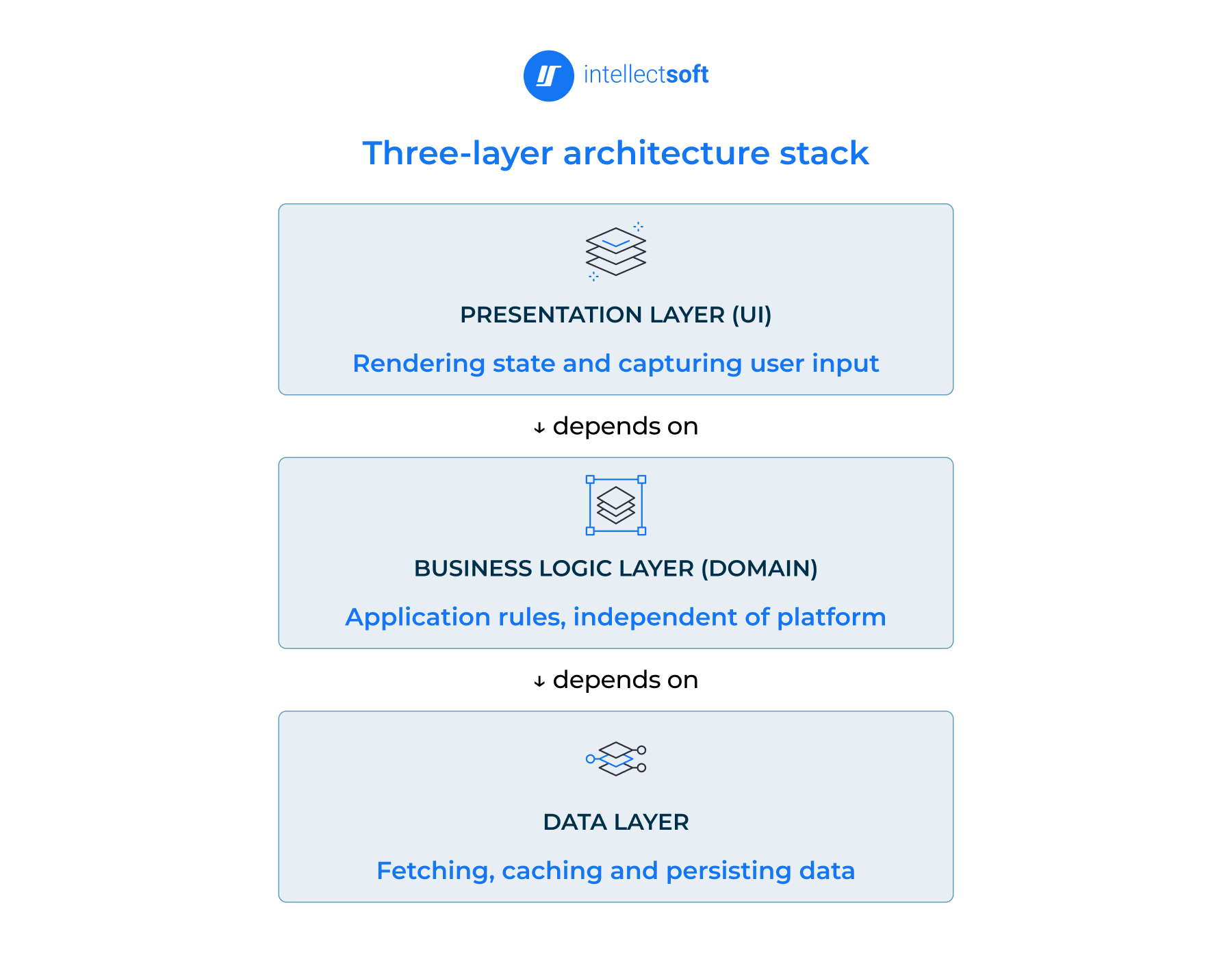
Presentation Layer
The UI layer turns state into pixels and gestures into events. View code lives here, along with routing, display formatting, and the state holder that keeps a half-filled form alive when the device rotates. A currency shown as £1,249.00 rather than 1249.0 is a presentation concern.
What leaks most often is decision-making. A view controller that works out whether a customer qualifies for a discount has taken on a rule that outlives the screen, the platform, and probably the design. Network calls issued straight from a view are the other frequent tenant. Both are invisible until the same logic is needed somewhere else.
Business Logic Layer
This middle layer holds the rules that would still be true if the app were a website or a kiosk. A booking cannot be canceled within two hours of departure. An order over a threshold ships free. These rules belong in use cases and domain models, expressed in plain language types that carry no framework baggage.
The tell that something has leaked is an import statement. When the business logic layer references a Retrofit annotation, a Core Data managed object, or anything with UI in its name, the rules have been welded to a platform, and porting them later means rewriting them.
Data Layer
The data layer fetches, caches, and persists. Repositories sit at its boundary and decide where a given piece of information comes from — a local database when the device is offline, the network when it is not, and neither when a fresh-enough copy is already in memory. Each type of data gets one repository that owns it. That ownership is what makes the single source of truth real rather than aspirational.
Two things creep in here that do not belong. One is user-facing wording, where a repository returns "Something went wrong, please try again" instead of a typed error the interface can decide how to present. The other is eligibility logic — deciding which items to return based on a business rule, rather than returning what was asked for.
| Layer | Responsible for | Typical Android components | Typical iOS components |
|---|---|---|---|
| Presentation (UI) | Rendering state and capturing user input | Composables/Activities, ViewModel | SwiftUI views, ObservableObject |
| Business logic (domain) | Application rules, independent of platform | Use cases, domain models | Use cases, domain models |
| Data | Fetching, caching and persisting data | Repositories, Room, Retrofit | Repositories, Core Data, URLSession |
Mobile App Architecture Patterns
Layering defines the location of the code, while the mobile app architecture patterns explain how the various components inside each layer communicate with each other. Each of these five makes a different wager on where the maximum complexity should be. Choosing between them is the central decision in any mobile application architecture.
Model-View-Controller (MVC)
MVC splits an app into data, presentation, and a mediator between them. The model holds state and rules, the view renders, and the controller receives input and updates both.
A fitness app logging a completed set illustrates the flow. The tap lands on the controller, which writes the set to the model and asks the view to redraw the session summary.
The trade-off is concentration. Everything that is neither data nor pixels ends up in the controller, which grows steadily. Apple's Cocoa variant makes this sharper, because the controller also owns the view lifecycle and cannot easily be separated from it. It is the reason iOS developers coined "Massive View Controller" as a nickname for the failure mode. MVC remains reasonable for small apps and screens with little logic.
Model-View-Presenter (MVP)
MVP breaks the controller's dual role apart. The view becomes a passive interface that exposes methods like showBalanceError(), and the presenter decides when to call them.
Consider a bank transfer screen. The presenter validates the IBAN format, checks the amount against the daily limit, and instructs the view to display a specific error — all without touching a single platform type.
That is the point of the pattern. A presenter talking to an interface can be tested on a laptop with no simulator running, which is why teams with strict coverage requirements still reach for it.
The cost is ceremony. Each of the views associated with a screen requires its own interface and presenter, leaving those interfaces filled with methods that exist solely to be mocked. As a result, a simple app accumulates many files that do very little.
Model-View-View Model (MVVM)
The pattern uses observable state instead of the presenter's commands. The ViewModel displays screen functionalities while the View subscribes. There is no reference to the View in the ViewModel.
A grocery cart demonstrates why that matters. Quantities change, and the ViewModel recalculates the subtotal, the delivery charge, and whether the free-shipping threshold has been crossed. Every subscribed element updates from one state object.
Both platforms have converged here. Android pairs a ViewModel with Compose, iOS pairs an ObservableObject with SwiftUI, and Google names this arrangement in its own guidance.
The trade-off is traceability. Control flow disappears into bindings, so a screen rendering the wrong number offers no stack trace to follow. Poorly scoped ViewModels also sprawl, ending up as the controller the pattern was meant to replace.
VIPER
VIPER adds two things the others leave implicit. Interactor holds business rules, Presenter shapes them for display, Entity carries the data, View renders, and Router owns navigation as an explicit component rather than a side effect of a button tap.
An insurance claim flow is where this earns its keep. Photograph the damage, answer questions that branch on policy type, skip a step when the vehicle is leased, then land in a different confirmation screen depending on the excess. Routing that in the views produces a knot.
Modularity is the payoff. Each component has one job, and a team can hand the interactor to one engineer and the router to another.
The cost is volume. A single screen becomes five files plus protocols, which is unjustifiable for anything simple.
Clean Architecture and the Domain Layer
Clean Architecture arranges the previous ideas into concentric rings and adds one rule that governs all of them. Dependencies point inward only. Nothing in an inner ring may reference a class, function, or variable from an outer one.
Transmissions across a boundary happen via two interfaces, one for the request and one for the response. If the use case would otherwise require a presenter, that use case instead depends on an interface it owns, and the presenter implements that interface. This is dependency inversion — the D in SOLID — and it is what lets data flow outward while dependencies still point in.
A logistics app makes the payoff tangible. Drivers scan parcels with no signal for hours. The rules about what constitutes a valid delivery live in the domain, untouched by whether the scan came from a camera or a Bluetooth sled.
The cost is indirection, and it is real. Clean Architecture suits long-lived products with budget for the setup. It is the most demanding mobile application architecture to set up, and the most durable.
| Pattern | How it splits responsibility | Best for | Main trade-off |
|---|---|---|---|
| MVC | Controller mediates between model and view | Small apps, quick delivery | Controllers grow unbounded |
| MVP | Presenter holds view logic behind an interface | Apps needing high unit-test coverage | One presenter per screen adds files |
| MVVM | View observes state exposed by a view model | Most production apps on both platforms | Needs a reactive/state layer |
| VIPER | Five roles, routing separated out | Large teams, many-screen apps | Heavy boilerplate for small apps |
| Clean architecture | Concentric rings, dependencies point inward | Long-lived apps, multiple clients | Over-engineering risk on small scope |
Types of Mobile App Architecture by Platform
Platform choice settles a single question before any pattern is picked: how much of the app exists once, and where the seam with the operating system falls. The layering stays the same in every mobile app architecture. What moves is the position of that seam.
Android App Architecture
Google has published an official architecture guide, the closest thing the platform has to a reference mobile application architecture. This guide recommends a 3-part split. There is an interface layer, a data layer, and a domain layer that is optional, added only when logic has started repeating across screens. The state is retained in a ViewModel layer that survives configuration changes; for example, it does not empty a partially completed form when the device is rotated.
Two principles hold the arrangement together. State flows down to the interface, and events flow up in the opposite direction, a unidirectional loop, and each type of data has exactly one owner — a repository that other components read from rather than duplicate. Jetpack Compose renders the result declaratively. Hilt supplies dependencies through constructor injection, which keeps classes from building their own collaborators and makes them replaceable in tests.
Teams building an Android app need to consider more than the architecture itself. The tools and frameworks around it also affect how efficiently a product can be built and maintained. The choice of approach to Android app development depends on how these pieces fit together, while different Android frameworks offer their own ways to support the architecture and development process.
iOS App Architecture
The platform itself is organized in four blocks:
- Core OS handles the file system, certificate validation and low-level device access;
- Core Services exposes databases and file control;
- Media processes audio, video and image formats;
- Cocoa Touch supplies interface elements and carries user input down to the code below.
That stack is the foundation an app sits on rather than a description of the app's own structure.
Above it, SwiftUI has changed the default. A declarative view describes what the screen should look like for a given state, and the framework works out the transition. The developer no longer scripts the steps between one screen state and the next. An ObservableObject publishes that state, views observe it, and the arrangement is MVVM in everything but name, which is why that pattern, rather than Cocoa's controller-centric model, is now the practical starting point for iOS app development on new products.
Cross-Platform App Architecture
Three approaches dominate, and they share different amounts of the app. React Native and Flutter share almost everything, including the interface. Kotlin Multiplatform shares the data and domain code while each platform keeps its own platform UI — a deliberate trade that gives up screen-level reuse to keep a platform-specific feel.
The architectural consequence sits at the boundary. It runs JavaScript alongside native code. Its newer architecture replaces the old asynchronous bridge with a direct interface between the two. This removes a serialization step that used to show up as dropped frames in list-heavy screens. Flutter sidesteps the question by drawing every pixel on its own canvas, then reaches platform capabilities through a channel or an FFI call. Xamarin no longer belongs in this conversation — Microsoft ended support in May 2024.
Whichever route a team takes, the domain should not know which one it is. This separation becomes particularly important in cross-platform mobile development, where teams have to decide what belongs in shared code and what should remain platform-specific. In React Native architecture, the same boundary determines how shared code interacts with native capabilities.
Hybrid and PWA Architecture
Hybrid applications operate web code within a WebView enclosed in a native shell. The interface is HTML, CSS, and JavaScript. Plugins from Ionic Capacitor or Apache Cordova reach the camera, filesystem, and other device capabilities that the browser cannot. The main selling point is that it ships updates without an app-store review.
Progressive web apps run entirely in the browser and drop the shell – a service worker caches assets so the app opens offline. Both architectures fit content, catalog, and internal tools. Neither suits graphics-heavy or heavily interactive products, where the WebView boundary becomes the ceiling and user experience depends on platform rendering.
Enterprise Mobile App Architecture
A consumer app usually talks to one backend built by the same team in the same year. Enterprise mobile app architecture rarely has that luxury. The app must connect to
- an ERP that was already in place before our mobile team existed;
- a warehouse system that responds in SOAP;
- a CRM whose rate limit was set for overnight batch jobs and not for 4,000 handsets polling at shift change.
Most corporate projects stall at this seam and not on the UI side. An API gateway or a backend-for-frontend service usually features here, giving the app one contract to code against, and whether the estate behind it is monolithic or split into microservices matters far less than the stability of that contract, as the mess behind it stays behind it.
Identity is the second divider. Workers anticipate that the application will already be signed in when opened, implying SAML or OpenID Connect against the corporate directory, silent token refresh, and a defined behavior for when the token expires mid-transaction. In cases where the data is restricted, the same flow also carries role information. The domain uses this to determine what a given employee may see.
Offline is where a mobile application architecture gets tested hardest, and scalability of the sync process decides whether it survives a thousand field users. A field engineer completes eleven service reports in a basement plant room with no signal. A dispatcher reassigns two of those jobs while the engineer is underground. Reconnection produces a conflict, and something has to resolve it. Last-write-wins quietly destroys an hour of work, so real systems version each record and either merge by field or surface the clash for a human. That logic belongs in the data layer, written once, and it needs designing before the first sync ever runs.
Two more constraints shape the build. Device management wraps the app in policy — remote wipe, forced OS versions, an MDM profile that can revoke access to a lost handset before lunch. Audit requires that certain actions leave a trail that survives the device. So, an approval recorded offline still has to arrive with its original timestamp and actor intact once the network returns.
None of this is exotic. It is the ordinary weight of enterprise application development. It explains why the same feature list costs several times more inside a large organization than outside one.
Key Principles of Good Mobile App Architecture
Separation of concerns. Each component should have one reason to change. When a VAT rate changes and the edit touches a single pricing file, separation of concerns is real. When it touches seven files, including two screens and a notification handler, the word has been used, but the work was never done. This is the principle the other five depend on.
Single source of truth. Every piece of data gets exactly one owner, and everything else reads from it. Without that rule, a cart badge showing three items works next to a cart screen listing two, because two components each kept their own copy and only one heard about the deletion.
Unidirectional data flow. State travels down from its owner to the interface, and events travel back up. Nothing writes to state it does not own. The practical gain is reproducibility. A bug arrives with the state that produced it, and an engineer replays that state instead of guessing which of nine components mutated the value.
Testability. This is a property of the design, not an activity for the QA team. Logic reachable only by tapping through four screens will be tested manually, or eventually not at all. The same logic behind a function signature gets a test on every commit, and the difference in defect rate is not subtle.
Modularity. Splitting a codebase into modules with declared dependencies does three useful things at once. Build times drop because only changed modules recompile, teams can own a module without merge conflicts, and an accidental dependency becomes a compile error rather than a discovery made months later. Those boundaries also make it feasible to extract a feature into a second app.
Scalability and performance. Scalability at the codebase level means the tenth engineer is roughly as productive as the third. At runtime, it means the app that handled two hundred records still behaves at twenty thousand. This is usually a data-layer question about pagination and caching rather than a UI one. Performance work is far cheaper when the layer responsible for it is identifiable. Maintainability is the sum of everything above, measured in how long a competent newcomer needs before shipping safely.
Factors to Consider Before Designing Your Architecture
For a solid background for a mobile app, some things should be considered first and foremost. Specifically, building a mobile app requires your foresight in five key dimensions:
- Choosing the mobile app dimensions that fit your preferred devices.
- Prescribing scenarios for different qualities of Internet connection.
- Polishing UI details for your target audience.
- Picking the proper navigation between the elements on a screen.
- Deciding how data is protected on the device and in transit.
Here are the specifics for each of these elements.
Determining the Device Types
The parameters of smartphones determine the specifics of your mobile app. Think in advance about how it will run on each screen (meaning its size and DPI), how the app will be compatible with the processor (CPU), and how much memory it needs. The proper attention to these hardware and software details will make your mobile solution more stable and reliable.
Also, make sure your app will work well not only on smartphones and tablets but also on different smartphone models.
Considering Bandwidth Scenarios
Another thing to consider is the compatibility of your mobile app with different types of Internet connections. Many developers don't acknowledge this nuance while working on mobile app architecture. Be more prepared and get ready for the worst-case scenario.
This problem is worth your attention when meeting your remote target audience. All over the world, the availability of the Internet network will differ. Some countries already have 5G, while others still rely on 3G. Moreover, the speed and battery usage characteristics matter here. Thus, ensure your mobile solution has everything needed to guarantee a comfortable experience for your users anywhere, including offline mode.
Defining User Interface
Awesome UI and user experience are always a must for a mobile app. Built on the basic presentation layer, it becomes the point of interaction with users. The key to success is to give them a solution that is both simple and creative. Besides, your mobile app architecture design choice should always meet the demands of your target audience.
Picking the Right Navigation Method
Finally, proper navigation is about finding a fair compromise between user expectations and app restrictions. It's the result of exquisite artistry in linking the frontend and backend in one solution.
Among the possible options, pay attention to these top 5 methods that users like:
- Stacked navigation bar — you design a fixed bar and put links there to all other elements within your mobile app.
- Tab controller — a container that allows switching between groups of tabs with links.
- Modal controller — the screen menu that allows switching between tabs and links.
- Single view — a screen with one element and an option to go back.
- Gesture-based navigation — the intuitive tool that encourages the use of finger combinations or efficiently interacting with the Home button to cause an action on the screen.
To pick the best navigation method, learn your customers! Some styles are intuitive for them, while others confuse or bore them.
Planning for Security
Mobile application security is an architectural decision. Four questions decide most of it.
Data at rest comes first. Credentials and tokens belong in the platform keystore — Keychain on iOS, the Android Keystore system — rather than in shared preferences or a plist, and a local database holding personal data should be encrypted. Data in transit needs TLS, with certificate pinning where the threat model justifies it.
Authentication is the second. Token lifetime, refresh handling, and the behavior when a refresh fails all need defining early, because retrofitting them means touching every screen that makes a request.
The third question is storage discipline: what the app caches, for how long, and what a device wipe must remove.
The fourth is the API surface. An endpoint that returns a full customer record when the screen only renders a name has already leaked, whatever the client does with the payload. Security enforced on the client is not security. Authorization belongs on the server, and the mobile client should never be the thing enforcing it.
Mobile App Architecture Best Practices
Five practices separate a mobile application architecture that ages well from one that needs rescuing. Teams that adopt these best practices early keep app development costs predictable.
Modular by feature. A folder tree of views/, models/, and utils/ means every feature is smeared across all three, and no module can be extracted or handed to another team. Group by checkout/, onboarding/, search/ instead, each with its own internal structure. The test is whether deleting a feature means deleting one folder.
Keep domain logic platform-free. Business rules should compile without any mobile framework present. Enforce it mechanically rather than by convention. The module holding those rules does not declare a dependency on the platform SDK. So, a stray import fails the build instead of passing review, and dependency injection keeps that boundary easy to hold. Separation of concerns that relies on people remembering it will decay by the third sprint.
Define the state model before the UI. Write down what a screen can be — loading, empty, populated, failed, refreshing-while-populated — before anyone opens a design tool. Most production bugs are states nobody named, like the spinner that never stops because a failure path was never modeled. Naming the states early also settles which features belong in the first release, since a scope that produces forty states for one screen is a scope worth cutting.
Isolate third-party SDKs behind interfaces. Analytics, payments, crash reporting, and push all arrive as vendor code that changes on the vendor's schedule. Wrap each behind an interface the app owns. Switching providers becomes one adapter rewrite rather than a search across two hundred call sites. This also keeps vendor types out of the domain layer.
Design for testing from the start. Testability cannot be added later, because the thing preventing it is the structure itself. A rule of thumb: if verifying a behavior requires a running device, it lives in the wrong place. Teams that adopt these best practices early spend their refactoring budget on product decisions rather than on undoing the first six months.
How to Choose the Right Mobile App Architecture
1. Define the Scope and Expected Lifespan
Lifespan is the single biggest input into mobile application architecture. An app expected to run for six years justifies structure that a twelve-week campaign app does not. Count the screens, name the integrations, and write down how long the thing has to survive. A prototype validating demand should stay thin — layered architecture with three folders and no ceremony. Products with a five-year horizon earn stricter boundaries, and that horizon also shapes the backend. A monolithic service is faster to ship and perfectly adequate for most apps, while microservices only pay off once separate teams need to deploy on separate schedules. Estimating the horizon means looking beyond architecture, too. The expected mobile app development cost and how long it takes to build an app help determine whether the chosen level of structure makes sense for the product's lifespan.
2. Decide Native, Cross-Platform or Hybrid
This architecture choice constrains everything after it. Native wins where the app leans on device capability — background location, camera pipelines, tight animation, health sensors. Cross-platform wins where two platforms need the same behavior. The team is small enough that maintaining two codebases would halve its output. Hybrid fits content and catalog apps that change weekly. The trade-offs deserve their own read, which is why we treat native vs cross-platform as a separate decision rather than a footnote.
3. Choose the Pattern That Fits Team Size and Screen Count
Pattern selection is mostly arithmetic. Under ten screens with two engineers, an observable-state pattern is enough, and anything heavier is ceremony. Scalability of the team matters as much as scalability of the app. Above forty screens with several squads, explicit component boundaries start paying for themselves, and a five-role split or a Clean-style arrangement stops looking like overhead.
4. Decide Whether a Domain Layer Is Justified
A separate layer for domain logic is optional, and Google says so in its own guidance. It makes its place when the same rule appears in three or more screens, when rules are complex enough to deserve their own tests, or when those rules will outlive the current interface. Where a screen displays what an endpoint returns, adding use cases produces files that forward calls and nothing else.
5. Plan for the Second Platform and the Second Team
Most architecture regret arrives at the second thing. The second platform, the second team, the second brand on the same codebase. Ask what happens when Android follows six months after iOS, and whether anything beyond the interface would need rewriting. Ask what a new engineer touches on day one, because an app nobody can safely modify without a two-week ramp has a structural problem regardless of how clean the diagram looks. Good user experience on the tenth release depends on decisions made before the first.
| If your app is... | Choose this structure | Choose this pattern |
|---|---|---|
| An early-stage or proof of concept | Single module, native or cross-platform | A single controller-led pattern |
| A product with a 3+ year roadmap | Layered, with a separate domain | Observable state plus a Clean-style layering |
| Built by several parallel teams | Split by feature | Observable state or a five-role split |
| Offline-first or data-heavy | Repository-backed storage with a local store | Observable state with a single source of truth |
| Targeting both platforms at once | Shared domain and data, platform UI | Observable state on each platform |
Common Mobile App Architecture Mistakes
Business logic in the UI layer. The symptom is that the same bug gets fixed twice. A discount calculation is implemented in the checkout screen. But someone fixes the rounding, and three weeks later QA discovers the old behavior still lives on the tablet layout, because that screen has its own copy. Rules that appear in more than one file are not shared rules; they are duplicated ones waiting to diverge.
The god ViewModel. It starts reasonably and ends at nine hundred lines doing networking, caching, formatting, and validation. Two symptoms give it away. Every pull request touching that screen produces a merge conflict, and writing one unit test requires standing up six mocks before the first assertion. A state holder should decide what to show.
State held in more than one place. The badge says three, the screen lists two, and nobody can reproduce it on demand. Bugs of this shape typically need a specific sequence — background the app, receive a push, return — which is why they survive several releases. Weak state management in a mobile codebase almost always traces back to two components each keeping a private copy of the same value.
Bypassing the repository. One screen calls the network directly because it was quicker than adding a method. Caching exists in two places with different expiry rules. The team notices when cached reads work on four screens and fail on the fifth, or when a cleared cache fixes a problem in one part of the app and not another. Every shortcut of this kind removes a little more of the separation of concerns the structure was supposed to provide.
Over-engineering a small app. A twelve-screen catalog app built with full Clean Architecture and five components per screen has a real cost, and it shows up as velocity. Just as with the cost of web application development, the number of architectural layers is not a useful measure of value on its own. Adding one field to a form touches nine files across four modules. New engineers spend a fortnight learning conventions before shipping anything. Architecture should match the problem — an app with no rules worth isolating does not need three-layer separation to display a product list.
Building on the Right Architecture
Pattern choice matters less than the three things that surround it. Scope honesty comes first — an accurate reading of how long the product must live and how many screens it will really have, rather than the number in the first release plan.
Layer discipline comes second, and it is a daily habit rather than a decision: the boundary holds only while people refuse to cross it under deadline pressure.
Testability is the third, and it is the one that reveals the other two, because a codebase that resists testing has already lost a boundary somewhere.
Teams that get these right ship well on a simple observable-state pattern. Teams that get them wrong struggle on the heaviest one. Good mobile application architecture is mostly the sum of those habits, which is why the best practices above matter more than the diagram.
Intellectsoft has spent 19 years building software for enterprises, including Fortune 500 companies, across regulated and operationally complex industries. We build the environments where mobile app architecture decisions carry the most weight. Mobile app development teams that skip this step pay for it later. Our case studies show how those decisions played out on real products.
Planning a new app or replatforming an existing one? Talk to our app development specialists about the structure before the first sprint.
FAQ
What is mobile app architecture?
It is the set of structural rules that divides an app into layers and defines how data moves between them. Each layer takes one responsibility — rendering, business rules, or data access — and communicates through defined interfaces. Every mobile application architecture answers those questions in its own way. Sound mobile app development architecture makes a codebase cheaper to change, test, and hand to a new team.
What are the three layers of mobile app architecture?
Presentation, business logic, and data. The presentation layer renders state and captures input. That middle layer contains rules that are true regardless of the platform, for instance, when to apply a free shipping promotion. The data layer is in charge of fetching, caching, and persisting, with repositories deciding whether to serve a request locally or over the network.
What is the difference between MVC, MVP, MVVM and VIPER?
They differ in how much they split the middle. MVC gives one controller both input handling and view lifecycle, which is why controllers grow. MVP moves decisions into a presenter that commands a passive view. MVVM replaces those commands with observable state the view subscribes to. VIPER goes furthest, separating business rules, presentation, entities, and routing into distinct components.
Which architecture pattern is best for mobile apps?
No single pattern wins. For most new products, an observable-state approach is the practical default — it is documented on both platforms and easiest to hire against. Heavier arrangements suit large teams and long branching flows. Small apps are better served by something light, since design patterns that exceed the problem cost velocity. The best mobile application architecture is the lightest one that fits.
What architecture does Google recommend for Android apps?
A UI layer, a data layer, and an optional domain module added only when logic repeats across screens. State sits in a ViewModel, data flows down while events flow up, and each data type has a single owner. Google's guide pairs this with Jetpack Compose and dependency injection through Hilt.
What is the best architecture for iOS apps?
MVVM has become the practical default, largely because SwiftUI works that way already — an ObservableObject publishes state and views observe it. Cocoa's older model still appears in older UIKit code. Larger teams with long branching flows sometimes justify a five-role split, though it costs several files per screen.
How does architecture differ between native and cross-platform apps?
The layering is identical; what changes is how much of it exists once. Native builds keep separate codebases per platform. React Native and Flutter share almost everything, including the interface, while Kotlin Multiplatform shares only business rules and data, leaving each platform its own UI for a more native user experience.
How do you choose a mobile app architecture?
Start with lifespan and screen count, then settle on native, cross-platform, or hybrid, then match the pattern to team size. Add a separate domain only where rules repeat or need their own tests. Mobile app development decisions made here are expensive to reverse, so a mobile application architecture is easiest to change before the first release. Plan for the second platform before the first ships.