In the end, every company hits the same wall: data is everywhere, but getting what you need on time is a hard nut to crack.
To receive an update, a client has to go to support. To access a document, an employee has to open three systems. To complete a simple task, they copy data from one tool into another. One small request becomes five clicks, two logins, and another ticket in the queue.
Web portal development turns that chaotic experience into one secure place to find information, access services, and get work done. We can picture a portal as a front door to all systems the business already runs — CRMs, ERPs, databases, APIs, documents, and workflows.
And the main task: how to make them work together while staying secure and compliant? This is the hardest part for our clients, and we address it with our custom web development services.
So what are portal types? What does its architecture look like? And how much time and money do you need to build it? All this and more, you’ll find in our guide.
What Is a Web Portal?
A web portal is a digital platform that pulls data and services from multiple systems into one experience. It centralizes, personalizes, and safeguards user access to information and actions according to user rights. For instance, a patient portal lets patients view lab results in one secure place. Or a supplier portal lets distributors check invoice status without contacting the finance team.
A portal acts as a controlled access layer between users and business systems. It brings together data, services, documents, and workflows. User roles and permissions controls coordinate what each person can see and do.
Web portal vs. website
People often confuse web portals with websites. And it’s natural, since both are web-based. To see the difference, you need to dig deeper and focus on functionality.
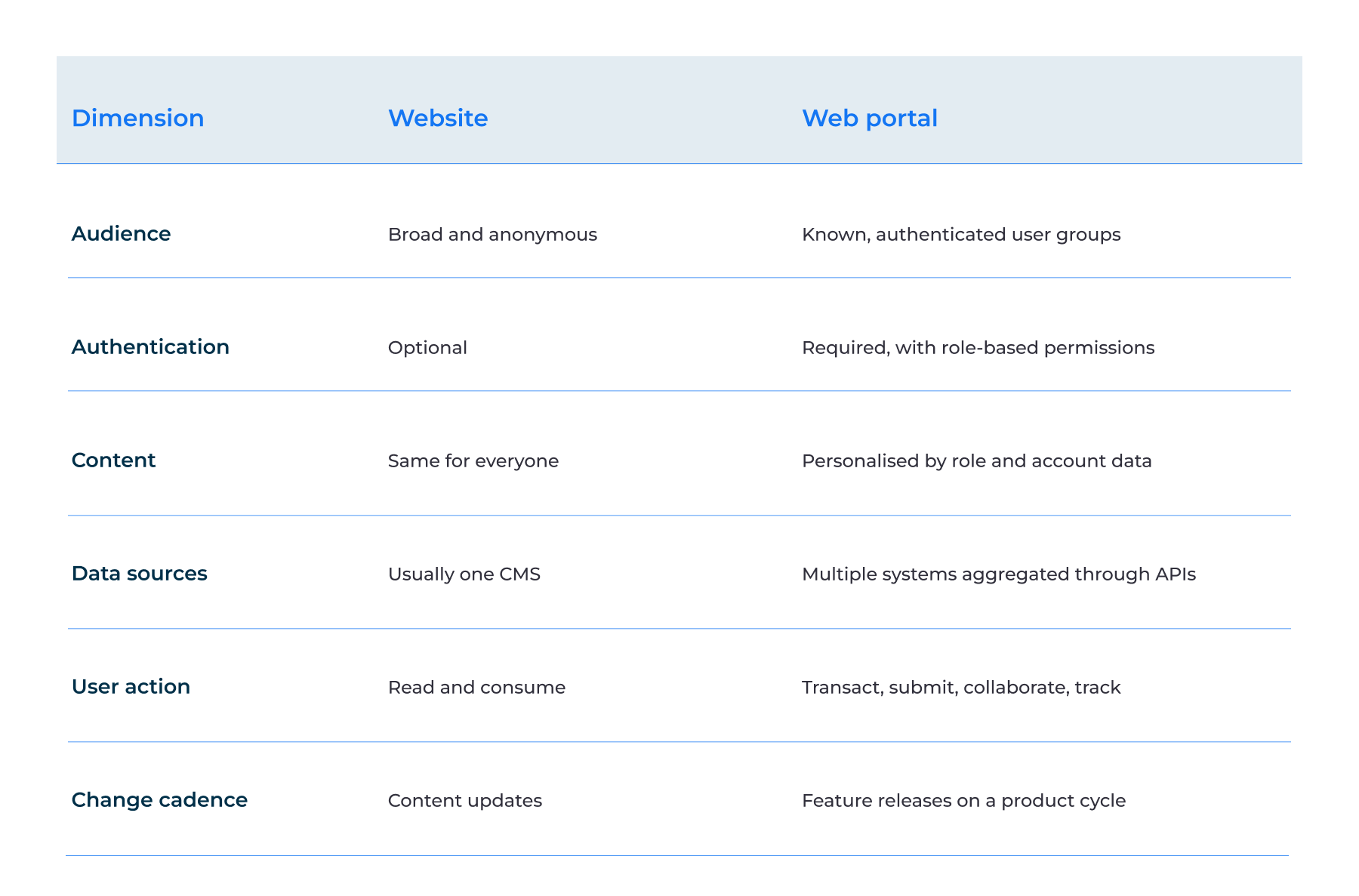
A website mainly helps people find and consume information. As a rule, it’s public and serves a broad audience. A web portal is built for known users who need to access information, services, or workflows.
A website may show the same content to everyone. A portal creates a more personalized experience—its information and features vary by a user’s role, account, and rights.
How do they handle data? This is what differentiates them. A website often relies on one CMS or a small set of content sources. A portal can connect to several systems — CRM, ERP, database, payment platform, or internal tools.
User actions are different too. Website visitors mainly read, browse, or submit simple forms. Portal users can submit requests, make transactions, track status, update information, team up, and complete workflows.
Finally, they follow different update cycles. A website often changes when content needs to be changed. A portal works more like a software product — with regular feature releases, security updates, and upgrades.
Web portal vs. web application
Another point of confusion is the difference between web portals and web applications. So we’ll clarify these points.
A web portal is a type of web application. It pulls data and services from multiple software applications into one location. With user rights access, it shows only the information and features they need.
A web application has a narrower purpose. For example, a team can use a dashboard to monitor sales while relying on a web app to manage one specific workflow, without pulling data from multiple systems.
The conclusion from all of the above: every web portal is a web app, but not every web app is a web portal. You can find more information about the distinctions between the two solutions in our enterprise web application development guide.
If you’re still uncertain what best fits your business, we offer web application development services to help you choose the right option.
Types of Web Portals
Customer/self-service portal
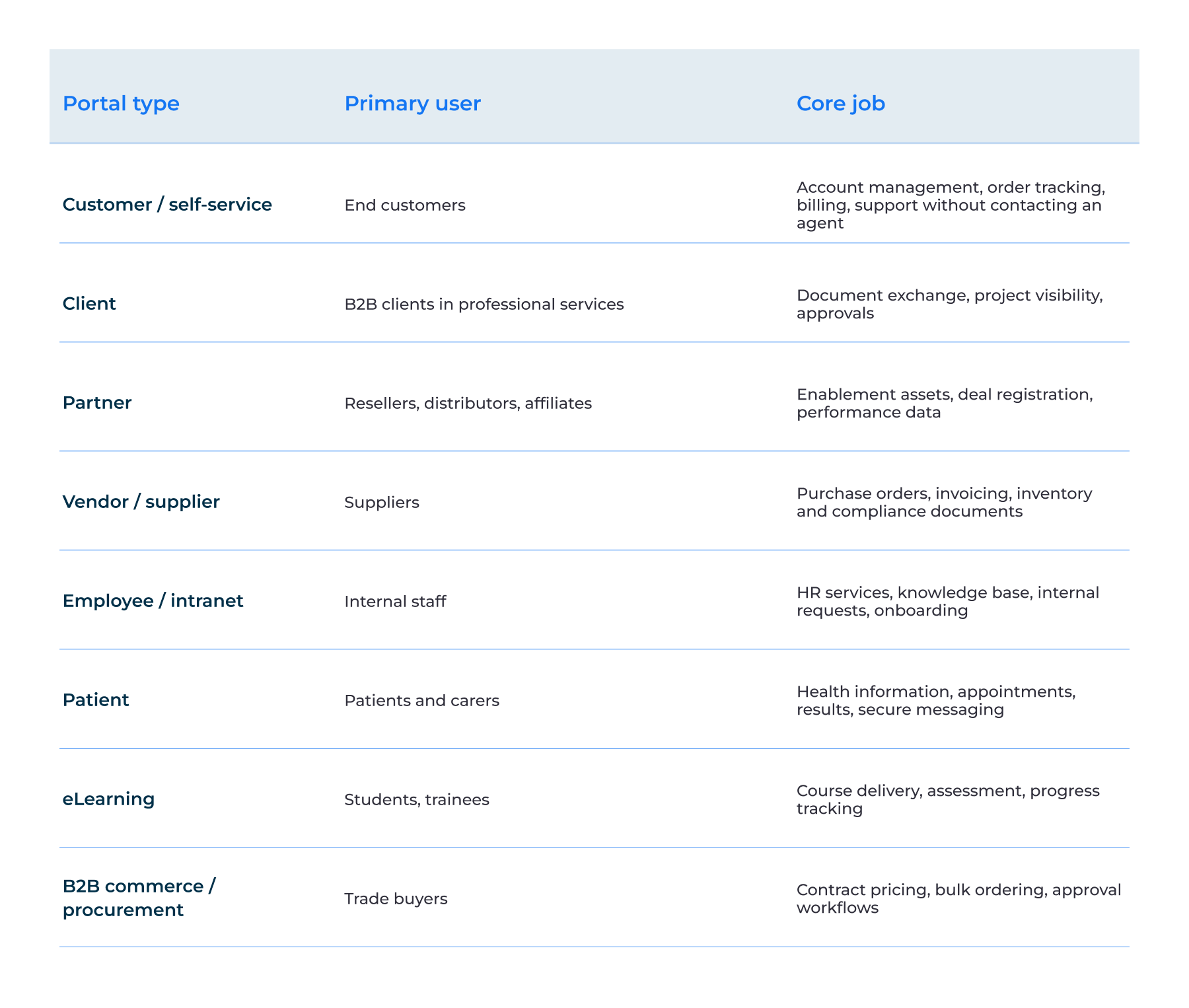
A customer portal gives users one secure place to take many actions — manage their user profile, track orders, view bills, and get assistance. They don’t need to ask an agent for every update; they can find what they need and complete simple tasks themselves.
For example, a construction company can use a customer portal software to share project updates and documents. The result: fewer support requests and faster issue fixing.
Client portal
A client portal gives B2B clients one space to manage work with a service provider. They can review documents, approve outcomes, monitor progress, and interact without long email chains. So development of web portal, helps clients get approvals faster and do less manual work.
Partner portal
With a partner portal, resellers, distributors, and affiliates get one location to manage their operations. Accessing sales materials, registering deals, checking pricing, and tracking performance — all these they can do without relying on many channels. As a result, they can speed up deal registration and partner responses.
Vendor / supplier portal
Through a vendor portal, suppliers have one site for orders, invoices, inventory, and compliance documents. They don’t need to send updates by email or phone because they can do all these operations on the portal. It's no wonder they process invoices faster with fewer data errors.
Employee/intranet portal
On an employee portal, staff can access everything related to their job — HR services, company information, requests, and onboarding materials. They don’t need to switch between systems to
find policies, submit requests, and handle routine tasks. So they spend less time on internal requests and admin work.
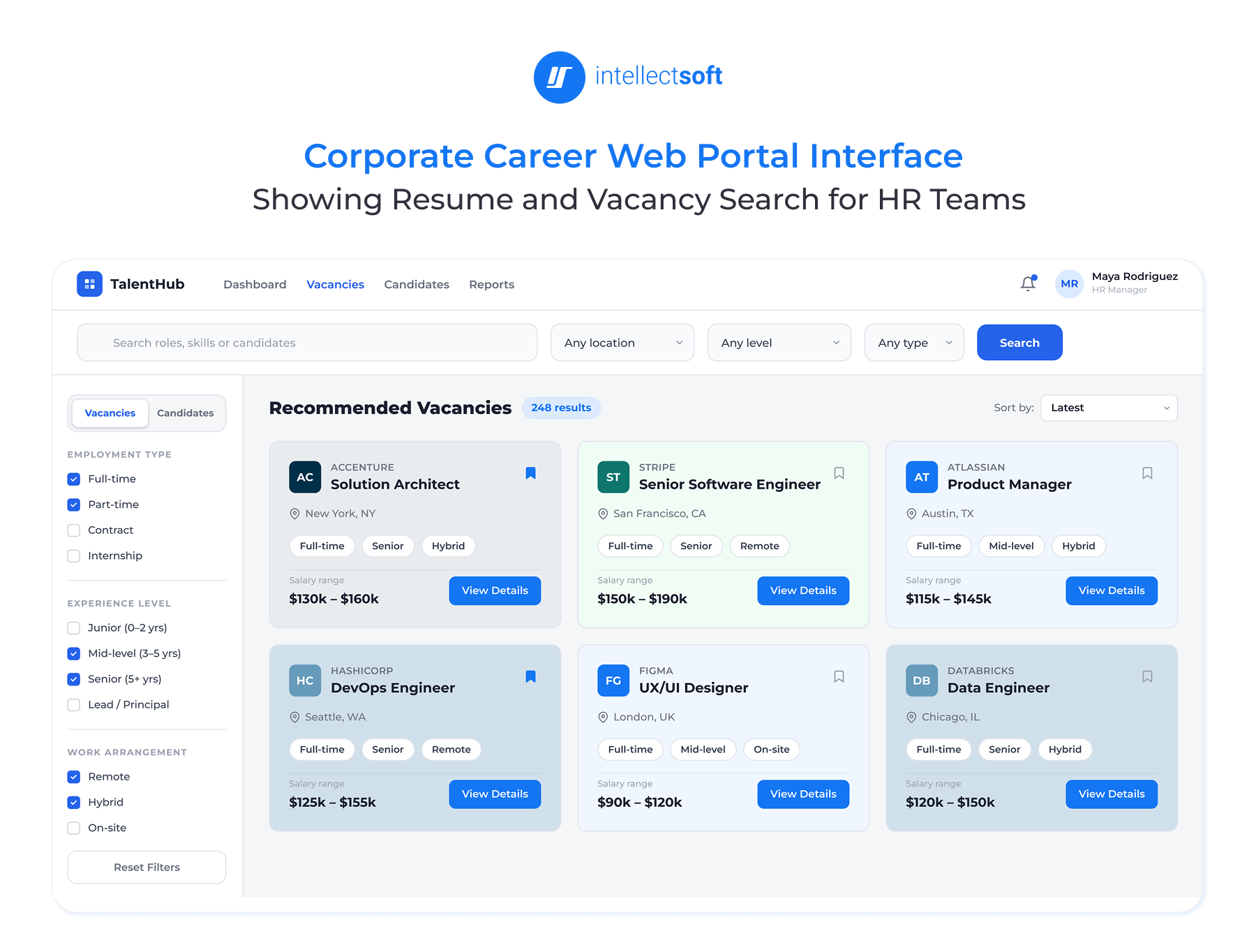
For example, at Intellectsoft, we built a corporate career portal for a banking institution to help them handle human resources.
Patient portal
A patient portal gives patients and carers secure access to appointments, lab results, medical records, and messages – everything is under one roof. They can view their information without accessing the systems behind it.
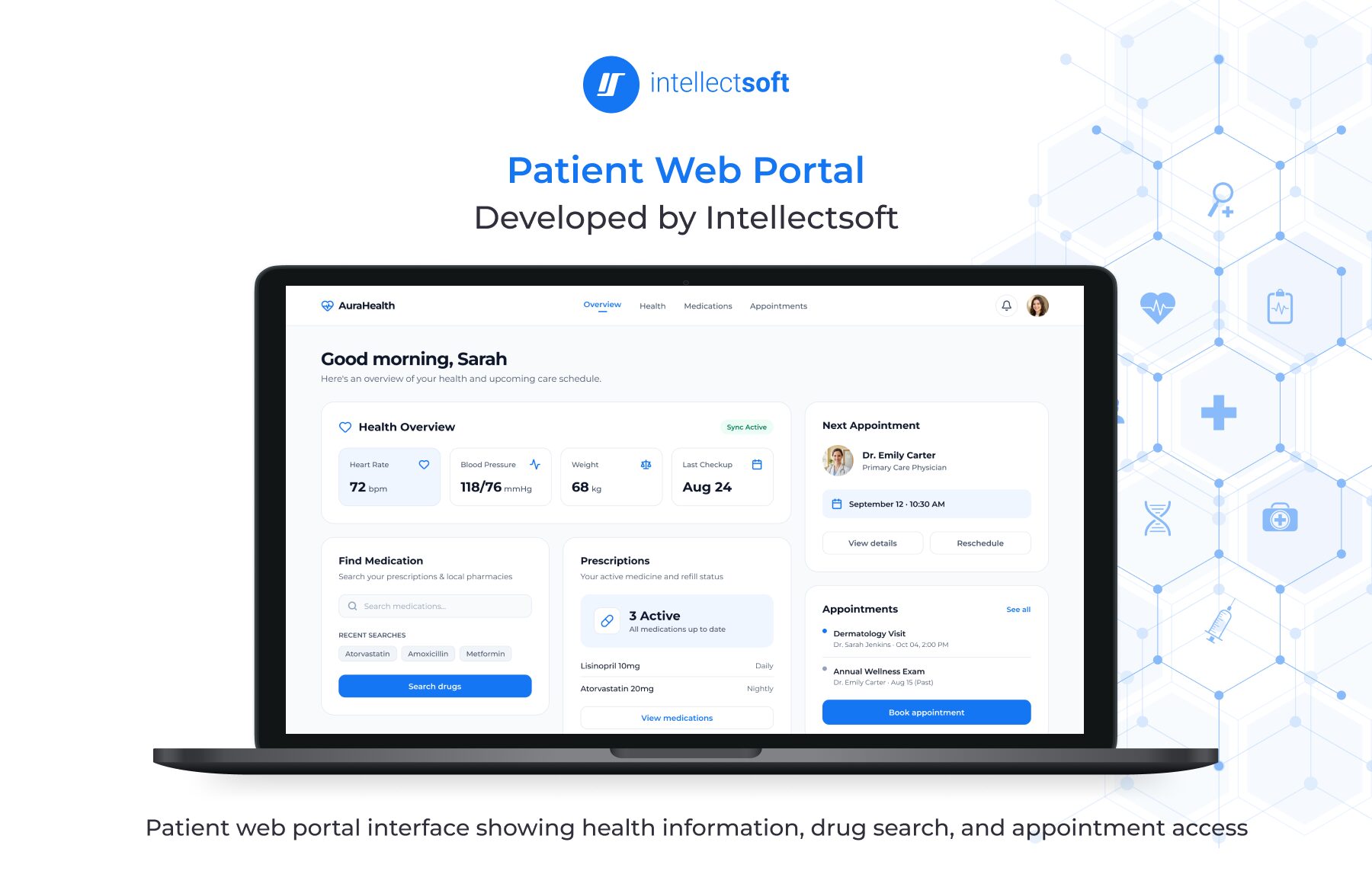
At Intellectsoft, we have an on-point example: we built a patient web portal to meet patients' needs better and improve health outcomes.
eLearning portal
An eLearning portal is a single spot for students and learners to access courses, complete audits, and monitor progress. They can learn without jumping between different systems. As a result, they have less admin work and can complete courses with higher outcomes.
B2B commerce/procurement portal
With a B2B portal, trade buyers can securely manage business purchases. They can see contract pricing, place bulk orders, and follow approval steps without relying on manual processes. The portal can also connect to inventory, ERP, and payment systems. All this lets them process orders faster with minimal manual steps.
Web Portal Development in Practice: Two Intellectsoft Projects
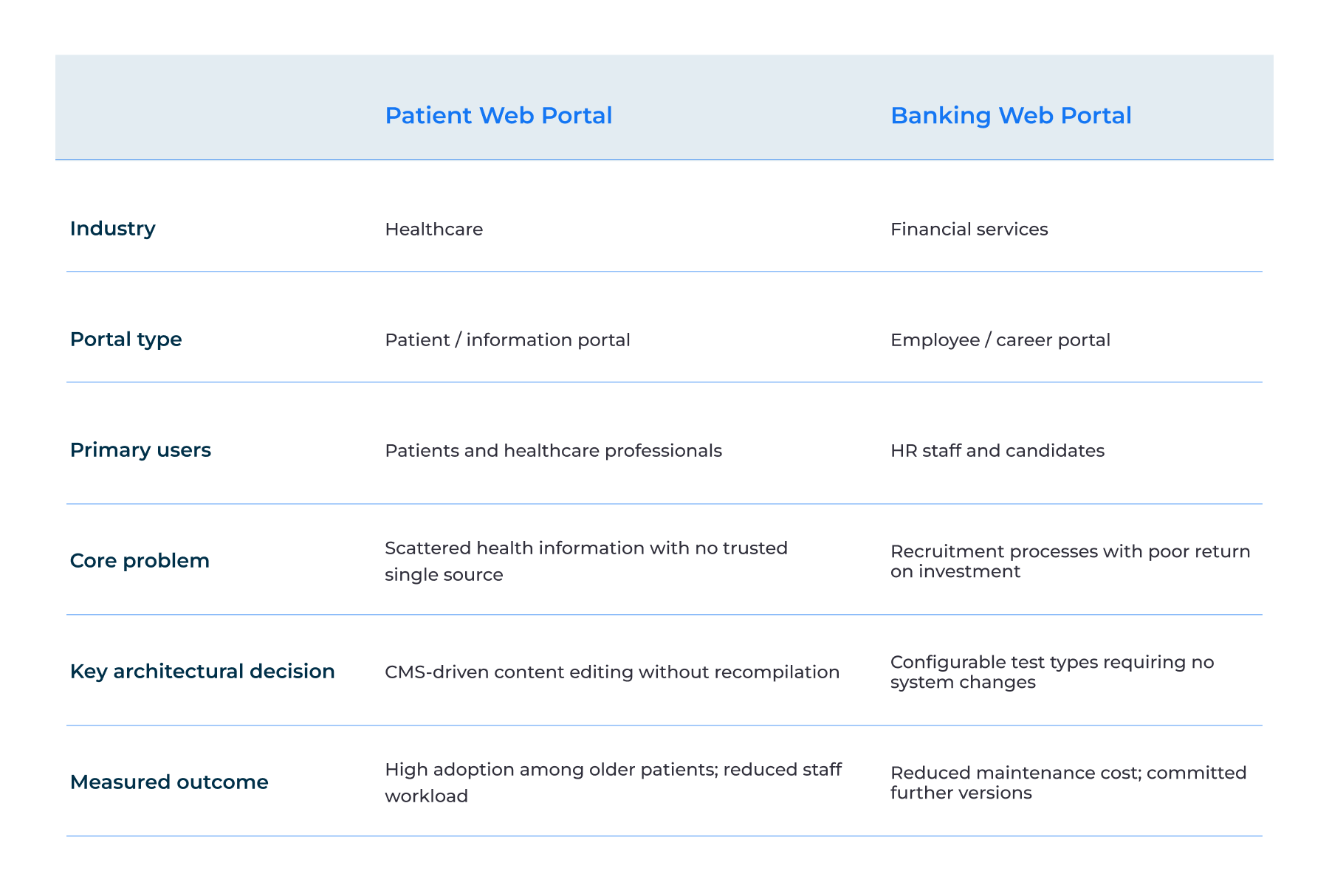
Depending on who uses it and what sits behind it, a portal can solve very different pain points. At Intellectsoft, we built two portals for regulated environments: a patient portal and an employee portal.
A patient portal aggregates reputable healthcare content together for external users. An employee portal speeds up recruitment processes for internal teams and candidates. Both solutions aimed to make the system easier to manage and scale. That’s the reason why building a web portal is a popular solution among businesses.
Patient Web Portal for a healthcare organization
Challenge: One place for reliable health information
A US healthcare provider needed one reliable place for all patients to find health information and medical guidance. The conditions were as follows. First, the aging population was growing. Second, more and more people were choosing patient portals and electronic health records.
Solution: A portal that the client could update
We built a patient web portal on Episerver CMS. So site owners can edit content, upload and change images, and update static information without recompiling the app. Patients can access medical articles, drug and symptom information, news, illustrations, and videos. Plus, they can find medications by symptom, shape, color, or imprint using a multi-attribute drug search.
Outcome: Better access and less manual work
The portal improved access to relevant medical information and saw strong adoption among older patients. This healthcare software solution has also cut the workload for hospital staff and helped patients become more active in managing their care.
The content-editing architecture made the portal easier to update. The client can change content without waiting for developers.
Banking Web Portal for financial services
Challenge: A recruitment process that didn’t pay off
A major bank spent a lot on recruitment. But they couldn’t get the results they expected. So they needed a better way to manage HR processes and search through resumes and job vacancies.
Solution: A career portal with custom search
We built a corporate career portal with a custom search engine for candidate and vacancy data. The system was also designed to support new test types without changing the core system.
Outcome: Lower maintenance costs
With our fintech software development, the portal was put into use right after launch. Maintenance costs dropped because new test types no longer required system changes. The client also had a clear roadmap for future versions.
The key decision was building configurability into the portal from the start. This made the system easier and cheaper to support as requirements changed.
What both projects show about portal delivery
These projects show that a good portal is more than a nice interface. The real value comes from bringing information and processes under one roof and making the system easy to upgrade.
Flexibility also matters after release. The patient portal lets content owners update information without developers. The banking portal lets the bank add new test types without changing the system. Both solutions were built with this flexibility from the start.
Core Features of a Web Portal
The right web portal features depend on who will use it and what they need to do. Here’s a list of features we recommend adding.
Access and identity
Authentication, single sign-on (SSO), and multi-factor authentication (MFA) are features the portal should include to remain reliable and secure. The web app should also use role-based access control (RBAC), so users can see only what they need based on their rights. Access should be flexible and easy to add and transfer.
Content and data
The portal should offer personalized dashboards and search across connected systems. It should also manage documents and versions, with notifications and alerts to keep users up to date.
Integration and workflow
For a smooth flow of data between apps, the portal should integrate with your existing systems — CRM, ERP, EHR, payment, analytics, and identity tools. To track key actions in the system, it should support approval workflows, submissions, and audit trails.
Operations and assurance
The portal should include analytics and reporting to track usage and key activities. It should also support encryption, responsive design, backups, and data recovery.
Web Portal Architecture: How the Pieces Fit Together
A web portal is an orchestration system that brings users, data, and business processes together. This is why enterprise software development for a digital platform is usually scoped more like an integration project than a website. So, let’s look at the structure of web portals.
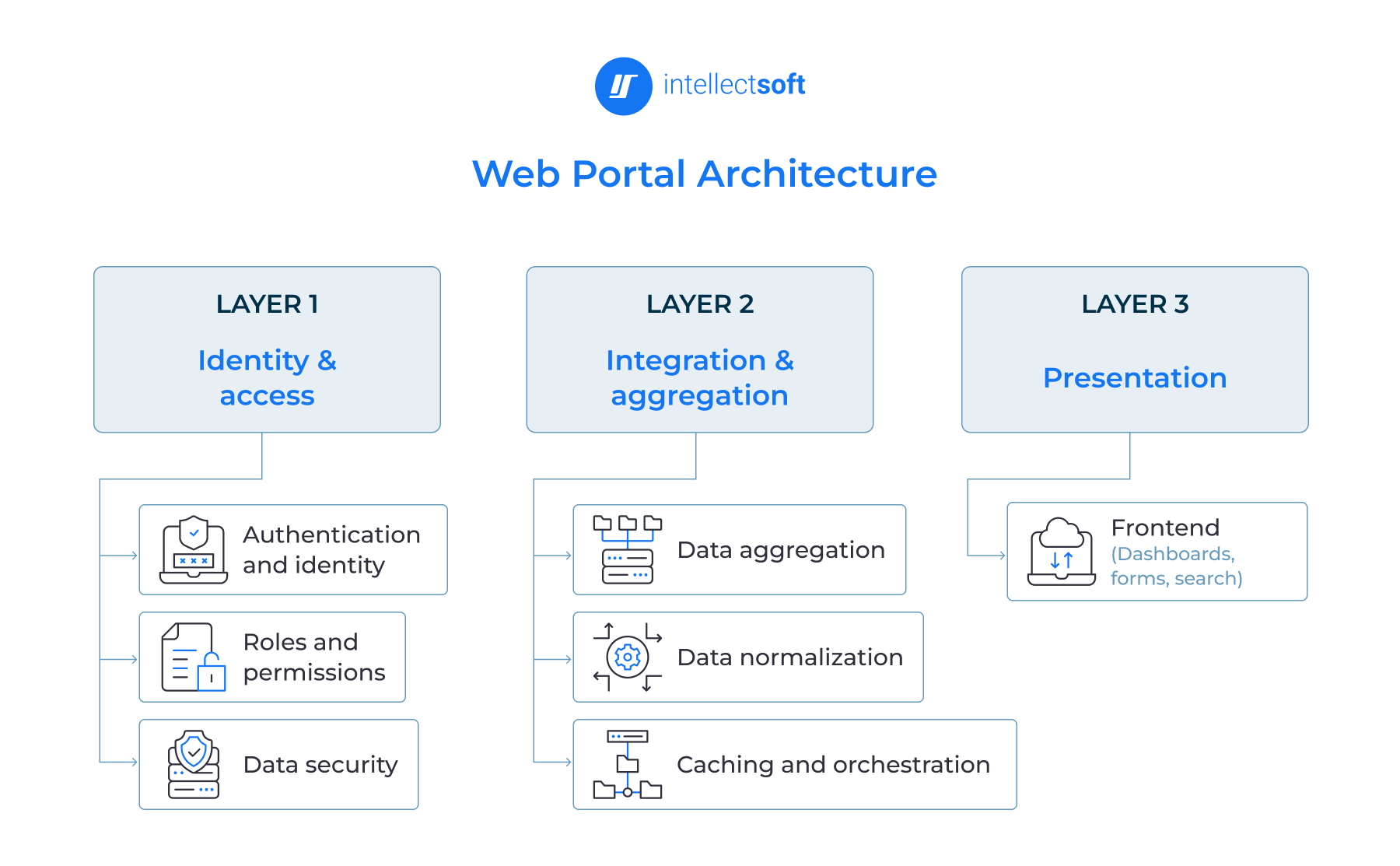
The identity and access layer
This layer answers a simple question: who can access what? User authentication, roles, permissions, and access to specific data – all this is managed here. This layer helps safeguard sensitive information as the portal scales and more user roles are added.
The integration and aggregation layer
This is the most complex layer of a web portal. The portal uses APIs and integrations to pull data from multiple systems—CRM, ERP, EHR, payment, and legacy software. An aggregation layer brings this data together, normalizes it, and can cache frequently used data.
Without it, point-to-point integration grows with every new system. Over time, this can become one of the biggest maintenance costs. A central layer makes it easier to add systems and improve scalability, including when the portal runs in the cloud.
The presentation layer
This is the part users see: dashboards, forms, search, documents, and other portal screens. It matters, but it covers the smallest part of the architecture.
It’s a common scoping mistake to treat the presentation layer as the whole project. But in fact, the interface requires a lot of hard work to do — identity, data, API connections, integrations, security, and business logic.
Our Patient Web Portal has a scalable architecture: its CMS layer separates content changes from code changes. So content owners could update information without involving developers.
Custom vs. Platform-Based Web Portal Development
Indeed, there is no single right approach to building a web portal, as your business needs, requirements, and resources define your choice.
A platform-based portal is a good choice when you can predict user roles, integrations, and requirements. But the portal needs to support complex integrations, follow compliance regulations, and require a long-term product roadmap. It's better to pick custom web portal development.
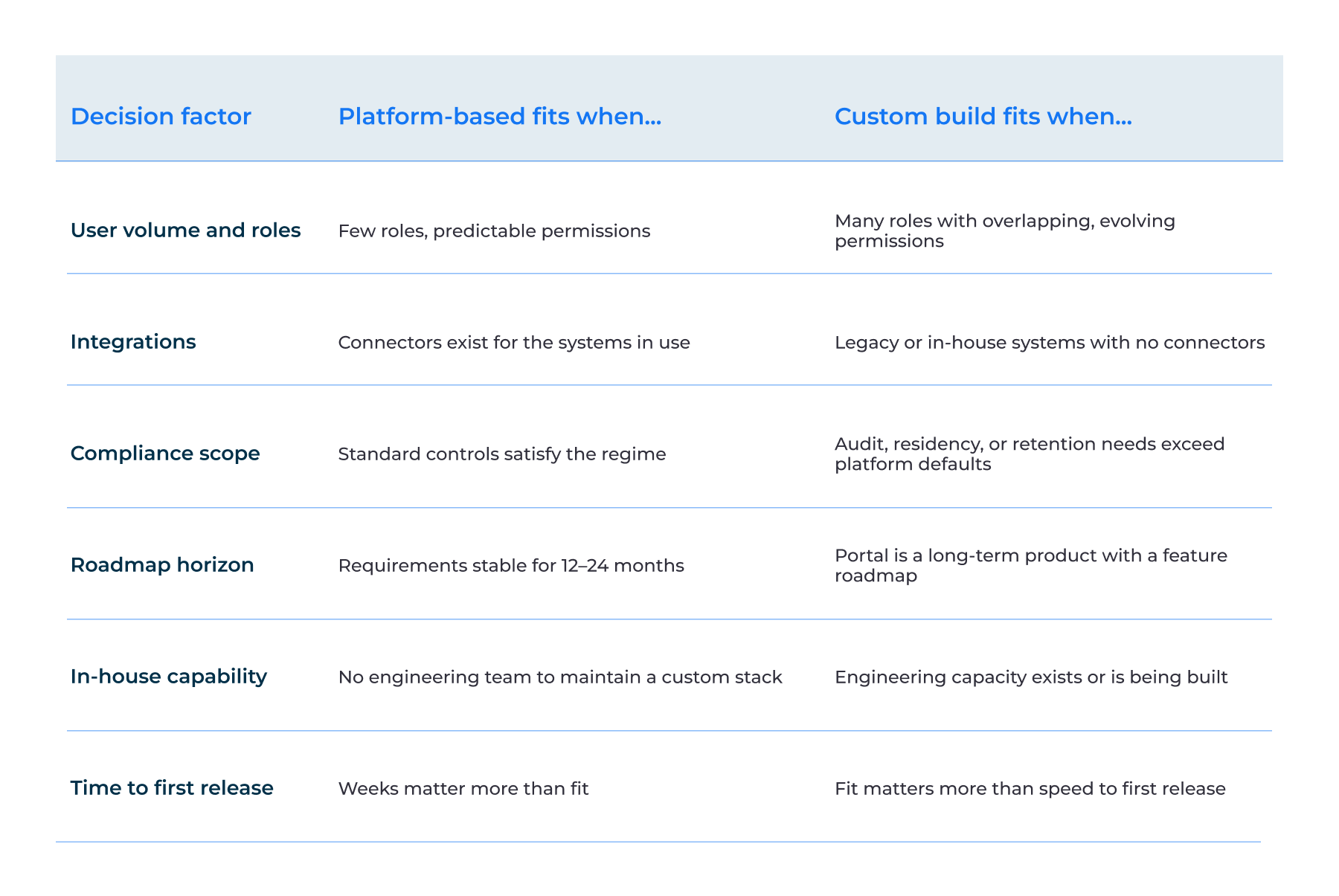
Our Banking Web Portal case shows why you need to build flexibility into solutions from the start. The portal was built so new test types could be added without changing the system. As a result, it saved maintenance costs. For complex portals, the right architecture can save more over time than a faster initial release.
Technology Stack for Web Portal Software Development
Now it’s time to talk about the “stomach” of a web portal: a tech stack unique to every solution. The portal’s users, integrations, data, security needs, and existing systems define what technologies you pick. Of course, during web portal software development, each technology should support the requirements that we set up at the architecture stage.
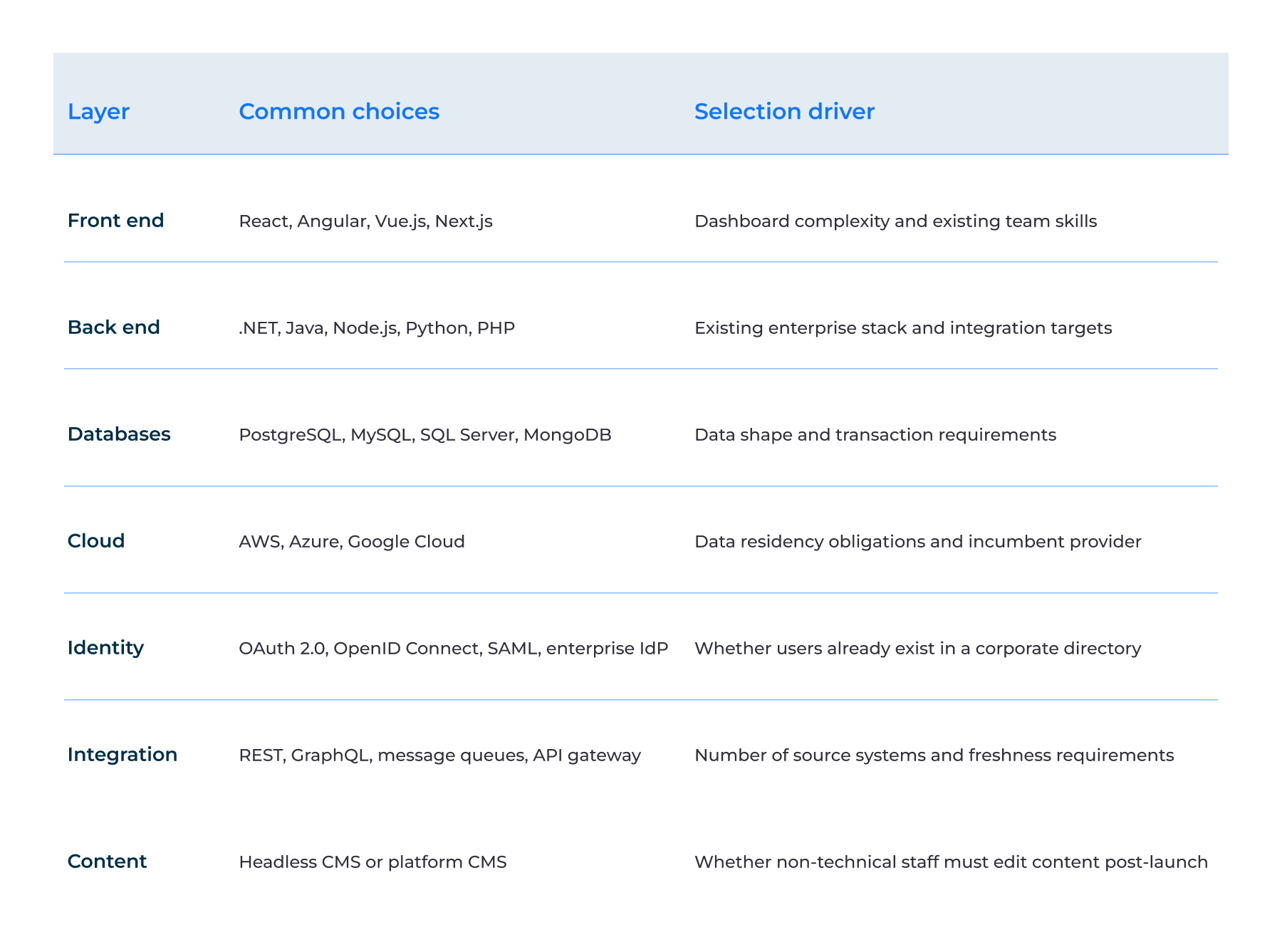
N.B. This stage aims not to choose the most trendy technology. It is to pick a tech stack that covers the portal’s current needs and can guarantee scalability.
Security and Compliance Requirements for Web Portals
The portal architecture should be built with security and compliance in mind from day one. The determine the following:
- How users log in and what they can access
- How data is stored and protected
- How the portal connects with other systems
- What needs to be tested before release
- In what order to build features
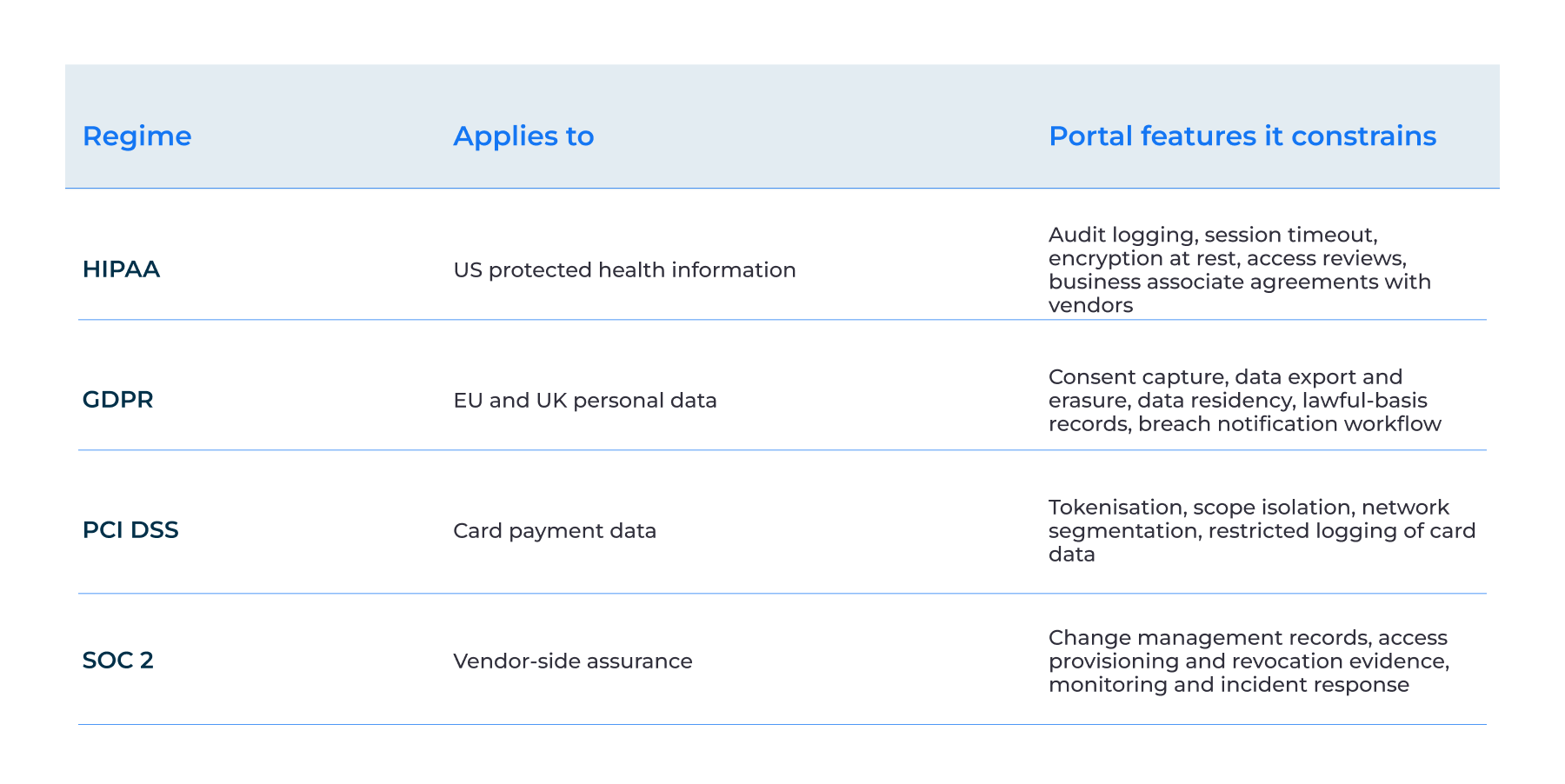
For example, HIPAA requirements can affect the architecture of healthcare services portals. As a rule, it’s cheaper to design security and compliance into the portal than to add them after deployment.
In our Patient Web Portal case, the architecture made content easy to update without changing the code. For example, HIPAA requirements can affect the architecture of healthcare services portals. As a rule, it’s cheaper to design security and compliance into the portal than to add them after deployment.
In our Patient Web Portal case, the architecture made content easy to update without changing the code. We apply the same approach for compliance: we build security controls in from the start instead of adding them later.
How to Build a Web Portal: The Development Process
We’re on the finish line in our guide, where we'll cover how to build a successful web portal that supports your business needs. Here are the steps you should follow to achieve the desired result.
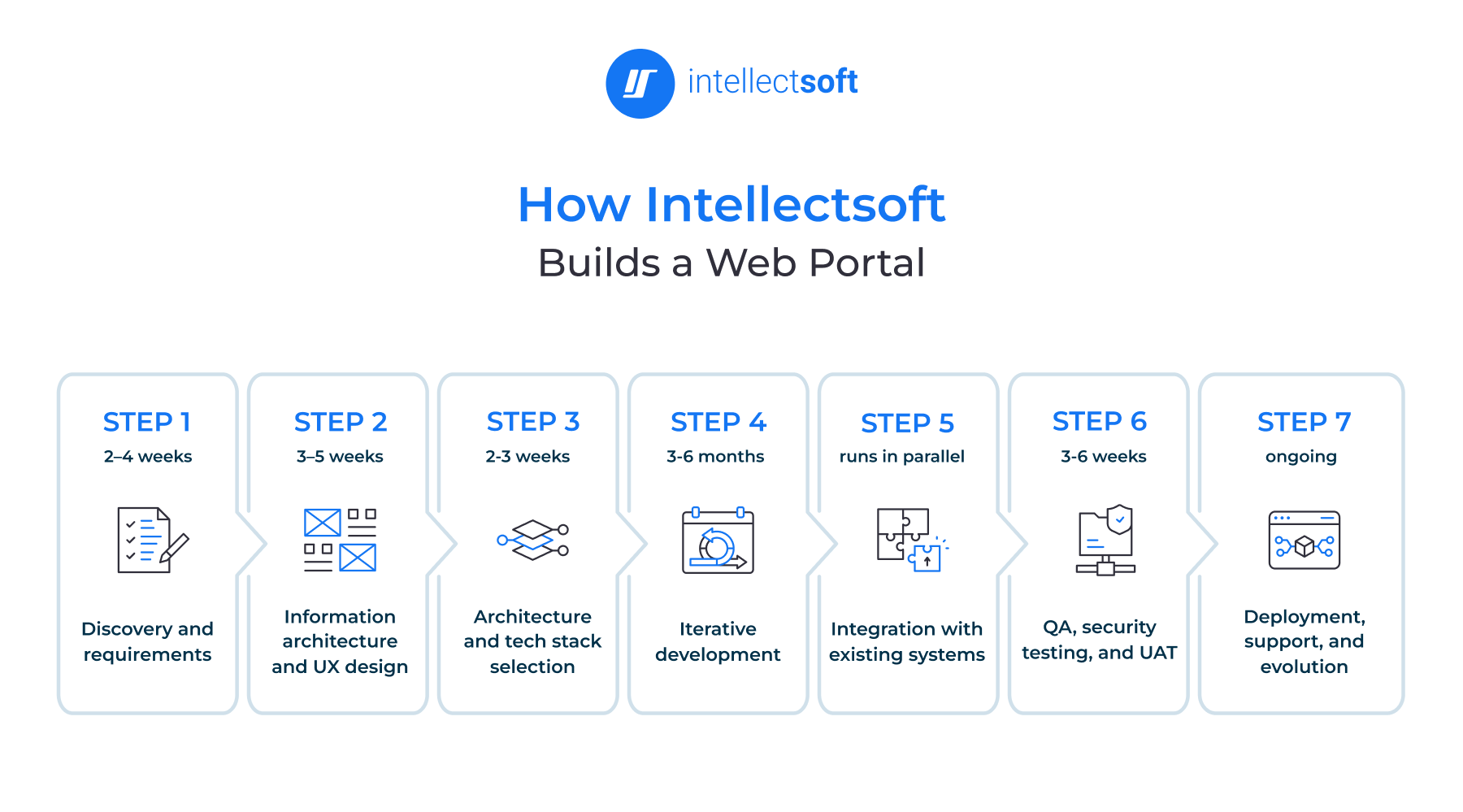
Step 1. Discovery and requirements — 2–4 weeks
First, you need to answer the most basic questions:
- Who will use the portal?
- What do they need to do?
- Which system must the portal connect to?
- How do you measure success?
When you get responses to them through research and discovery of your audience and business needs, you’re ready to head for another step.
What you’ll get at this stage: User role matrix, integration inventory, and success metrics.
Step 2. Information architecture and UX design — 3–5 weeks
Now it’s time to map the web portal's structure and design the main user experience. Do this before development. Wireframes and a clickable prototype are received, so you can test how users respond to your product and whether they’re pleased. What’s more, you can avoid expensive rework and negative feedback that often happens because of the initial validation. That’s why you should involve users early. At this stage, businesses opt for UI/UX services to make a digital product easy, clear, and fun to use.
What you’ll gain: Wireframes and a clickable prototype.
Step 3. Architecture and tech stack selection — 2-3 weeks
At this stage, we set up how the portal will manage users, data, APIs, integrations, security, and scalability. Plus, we pick the technology stack. Here, we prioritize the portal's requirements rather than choosing tools.
What you can expect: An architecture decision record.
Step 4. Iterative development — 3-6 months
We build the portal in sprints and release working increments along the way. Before a full portal release, stakeholders can review progress, test features, and adjust requirements.
What this delivers: Product increment at the end of each sprint.
Step 5. Integration with existing systems — runs in parallel
Next, we connect the portal to the systems users already rely on — CRM, ERP, EHR, payment systems, and identity providers. This isn’t a final-stage task. We do this parallelly with software development.
What you’ll get: Connected enterprise systems.
Step 6. QA, security testing, and UAT — 3-6 weeks
Once development and integrations are completed, we’re ready to evaluate its quality and its capabilities with our QA and Software Testing Services:
- How well the portal performs
- Whether its features work as expected
- Whether it protects user data
- How users respond to it
At this stage, we allow users to test real workflows before launch. This is vital to catch issues before they affect the real audience.
What you’ll have: Test reports, penetration test results, load test results, and UAT approval.
Step 7. Deployment, support, and evolution — ongoing
After launch, web portal development does not stop. We monitor the portal and its performance. If issues arise or performance drops, we’ll fix them. We’re committed to sustained improvements as the business scales up.
What you’ll gain: Live portal, support model, and release cadence.
Web Portal Development Cost and Timeline
The number of users, systems, and business processes the portal needs to support affects the web portal development budget. Of course, there should be a clear gap between the price and timeline of a basic portal with a few roles and integrations and an enterprise portal that connects legacy systems, handles regulated data, and replaces an existing platform.
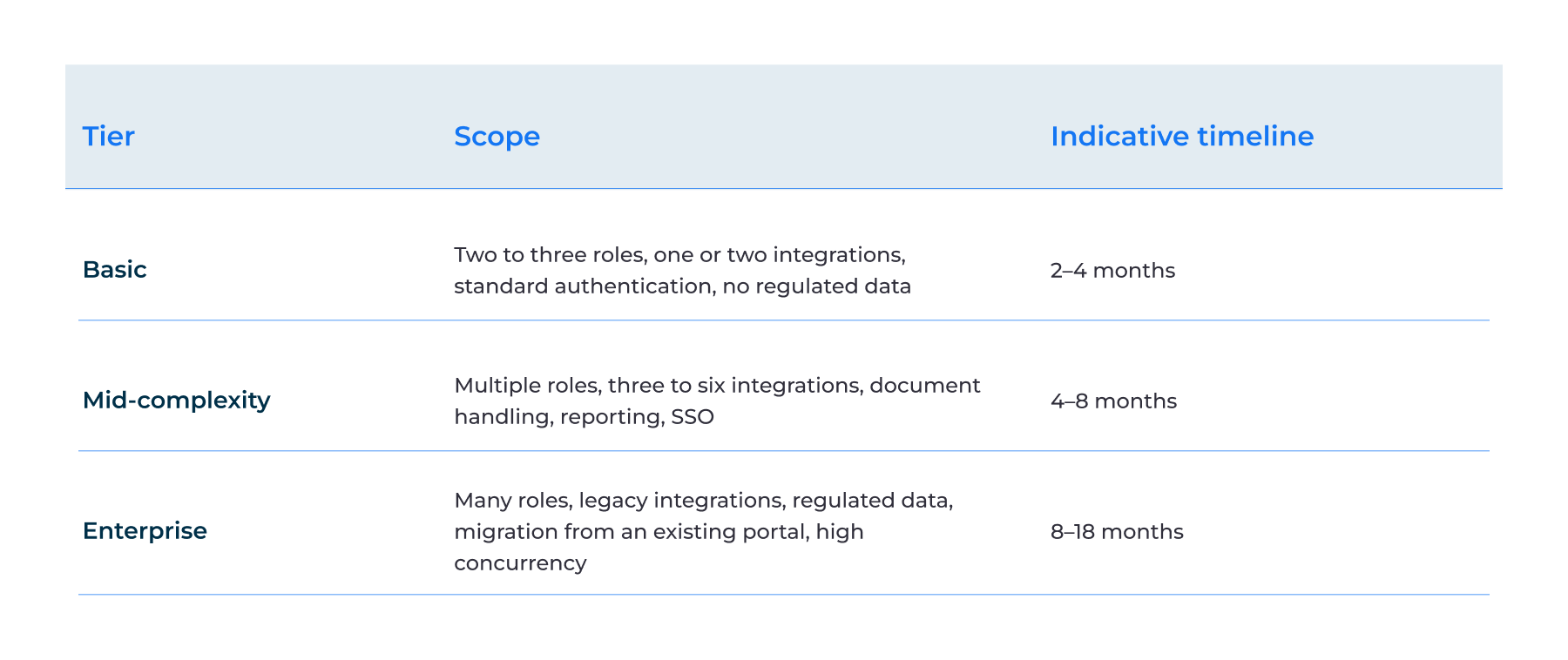
These are scope-oriented ranges without fixed prices or market averages. To get the broader picture of what influences software development costs, see our web app development cost guide.
What drives web portal development cost
Several factors can change the cost of a portal:
- User roles and permissions: More roles and permissions add complexity and increase the cost of access control.
- Integrations: The more integrations you need with your current systems—CRM, ERP, EHR, payment system, API, or identity provider— the higher the price of your web portal.
- Compliance: Regulated businesses need solutions that comply with HIPAA, GDPR, PCI DSS, and other requirements. In this case, web portal development investments will be higher.
- Custom vs. platform: If you need to add custom features rather than modify existing software, be ready to pay extra to tailor a solution to your business needs.
- Design and accessibility: Complex user journeys and accessibility requirements increase design and development effort.
- Data migration: Moving large amounts of old or poor-quality data can add significant work.
- Expected concurrency: High numbers of users accessing the portal at the same time require more attention to performance and infrastructure.
- Post-launch support: Long-term maintenance costs depend on monitoring, maintenance, security updates, and sustained changes.
As a rule, integration count and compliance scope drive the highest cost in comparison with the number of features alone.
Common Web Portal Development Mistakes
Web portals can work well in theory and still fail in practice. People used to think the main reason is the technology itself. But indeed, the biggest issues come from how the portal is built, integrated, and managed. Here are five common mistakes to avoid in web portals development.
Modelling roles on the org chart instead of on tasks
User roles should depict what people need to do, not their positions at the company. Plus, teams change, but tasks often stay the same. If permissions follow the org chart, every team change can add access problems and extra work. That’s why it’s vital to design roles around tasks and the required user experience.
Building point-to-point integrations
Connecting every system directly to every other system may seem simple at first. But as web portals extend, each new integration adds more connections to support. As a result, changes become harder and more costly. To avoid creating a web of dependencies, it’s necessary to build a clear integration layer.
Treating launch as the finish line
Launching the portal is only the beginning. You need to update it regularly, fix security issues, track performance, and add new features based on users’ needs. It’s a huge mistake to treat building a web portal as a one-time project — you’ll end up with an outdated system. That’s why, from the beginning, you should plan improvements and releases.
Leaving no named content owner
A web portal should have an owner of the content it contains. Without a clear ownership, the probability that information placed there can be outdated. So users may stop trusting the portal. Our Patient Web Portal is based on the opposite approach: content owners could update information without waiting for developers.
Shipping without an adoption plan
Even a well-built portal can decay if users do not use it. If people keep emailing or calling for information, the business won’t benefit from this solution. That’s why it’s important to onboard users, provide clear guidance, and offer support around launch. Plus, companies should improve the user experience based on real user behavior to increase adoption.
Replacing a Legacy Web Portal
One of the requests clients come to us with is replacing a legacy web portal, and this is also a part of our web portal software development. This involves rebuilding the interface and moving users, data, content, and integrations without disrupting daily work. Here’re a few tips that can help you complete it successfully.
- Start with users and content: Plan how to migrate user identities and accounts to the new portal. Also, decide what content to move, since not everything is useful.
- Transfer users in phases: Avoid switching everyone at once— it's better to relocate users by group or business unit. In some cases, the old and new portals need to run in parallel for some time. This reduces migration risk but adds to the budget.
- Rebuild the right integrations: You must review every integration with your systems—ERP, CRM, payment, identity, and other tools. The goal is to keep what supports your business needs and take out what doesn't.
How to Measure Web Portal Success
Measure a web portal's efficacy and success by the business outcomes it drives, not login statistics. Of course, the right metrics depend on the portal’s purpose. But they should also show whether users adopt it, complete tasks faster, and rely less on manual support. We’ve compiled the list of metrics for you to consider while starting custom web portal development.
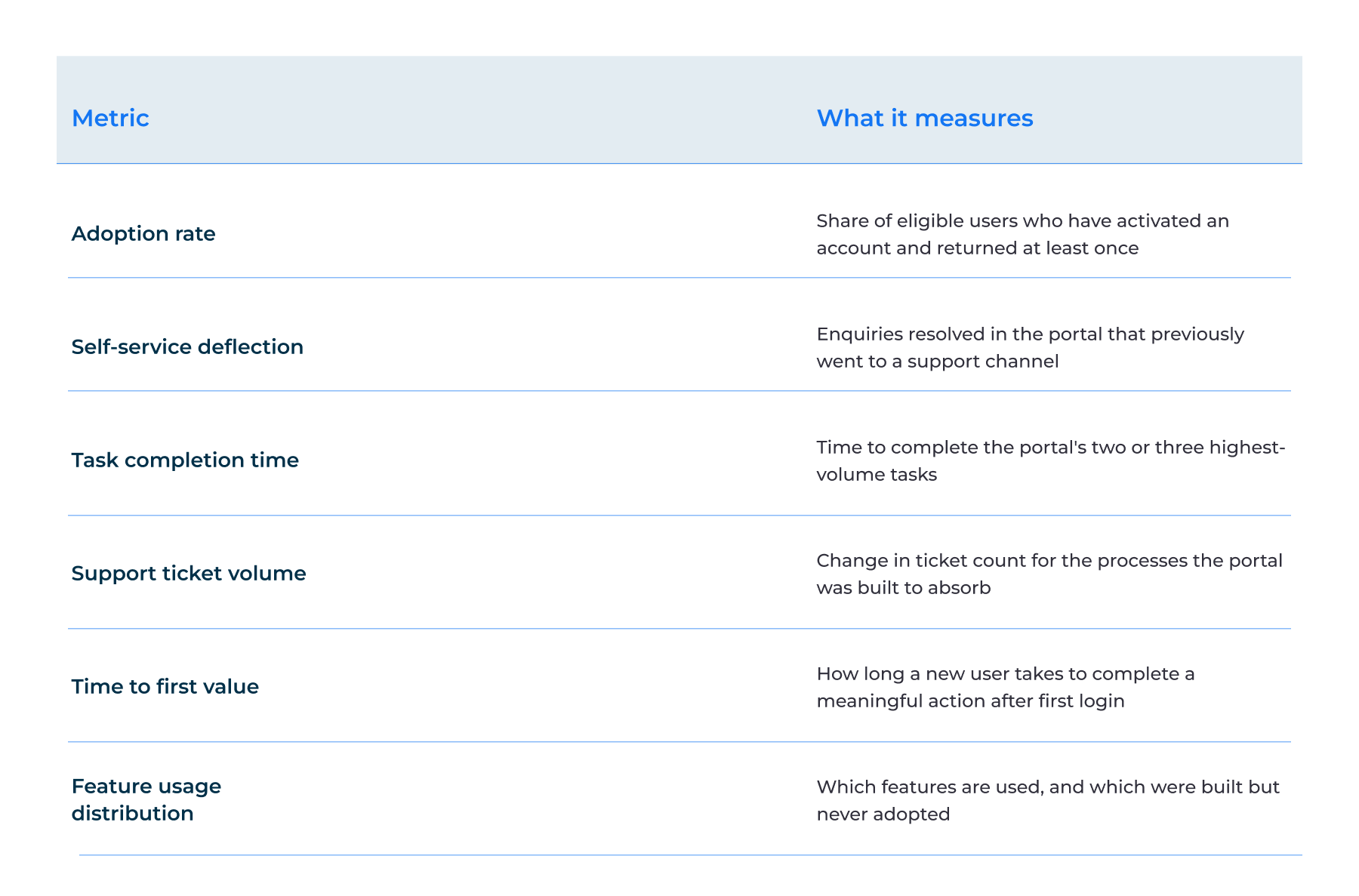
For example, self-service metrics show whether customers can find answers themselves without contacting the support team. Task completion time depicts whether the portal actually simplifies everyday workflows. An analytics dashboard pulls these numbers together and helps teams see changes over time.
Not every portal has the same success criteria. The success of a customer portal may be defined based on adoption and support deflection. For an employee portal, it’s better to focus on task completion time and internal ticket volume.
For example, in our banking web portal case, success metrics were how it reduced maintenance costs, proving that a usage rate is not always about business impact.
Choosing a Web Portal Development Company
Many businesses still think it’s enough to check a portfolio and find the right web portal development agency. The reality is different and requires going the extra mile. Hope these criteria help you pick a vendor that can work with your systems, meet your compliance needs, and support the portal after launch.
Integration and legacy experience
Before starting web portal software development, ask what portals can connect the specific systems you use. A good web portal development agency should share real cases of how they worked with tools similar to yours — ERPs, CRMs, payment systems, legacy software, and more.
Compliance track record
It’s crucial to check out whether the company has delivered portals in regulated industries and can comply with HIPAA, GDPR, PCI DSS, or SOC 2. Ask for real project examples and the controls used, not just certification badges.
Post-launch model
Clarify who owns post-launch processes like releases, monitoring, bug fixes, and change requests. Also, ask how this maintenance is priced. This is needed to avoid surprises once the portal goes live.
Why Intellectsoft for Web Portal Development
Why choose our team to build your web portal? With 18+ years of engineering experience, we have 35 Fortune 1000 clients to our credit. Our web development services cover the full portal lifecycle — discovery, architecture, development, integration, deployment, and post-launch support.
As a web portal development company, we have delivered applications for healthcare and financial services, including solutions that connect users with critical business data and workflows. We have a track record of case studies that reveal our expertise, the diversity of our web solutions, and our approaches to solving our clients’ pain points.
FAQ
What are web portal development services?
Web portal development services include the full-cycle planning, design, build, integration, and support of web portals. A portal brings data and services from different systems into one secure place. According to users’ roles and permissions, they can see only the data and tools they are allowed to access.
How to create a web portal from scratch?
Building a web portal moves through seven distinct phases — discovery and requirements, UX design, architecture and tech stack, development, integration with existing systems, QA, and deployment. The discovery and integration stages shape everything that follows.
How long does web portal development take?
- Basic portals – 2-4 months
- Mid-complexity portals – 4-8 months
- Enterprise builds – 8-18 months
Integration readiness, the number and complexity of existing systems, data sources, security requirements, and integrations affect the web portal development timeline.
How much does it cost to build a custom web portal?
Scope, number of integrations, design complexity, user roles, security and compliance requirements, data volume, and ongoing support needs – all these points affect the cost of building a web portal. You can find a detailed breakdown of the main cost drivers in the web portal development cost section.
What should a business look for in a web portal development services company?
Look for a custom web portal development company with the following characteristics – proven integration experience, a strong compliance track record, and a clear post-deployment support model. These points show whether the vendor can connect your current systems, protect your data, and keep the portal reliable after launch.
Why do web portal projects fail after launch?
A lack of a detailed adoption plan and an owner for content and updates after release can cause web portal projects to fail. Even a well-designed portal can decay if it’s difficult to navigate or if no one modernizes its content and features.