
Microsoft Foundry is Microsoft's platform for enterprise AI agent development. You can think of it as Microsoft's equivalent of AWS Bedrock, integrated into the Azure ecosystem.
In this article, we'll look at how we use Microsoft Foundry to solve real client problems. The goal here is to build a common bridge between business and delivery teams. In fact, both sides should speak the same language to deliver brilliant AI solutions to our clients.
We'll answer several practical questions:
- What is Microsoft Foundry?
- What business problems does it solve?
- How do you explain its value to a client?
- What are its main components?
- How do you start building production-ready AI agents with Microsoft Foundry?
AI Agents in 2026: Why They Matter for Enterprise Success
Over the last few years, enterprise AI has changed out of all recognition. And of course, we need to understand what is behind this evolution. The reason is pretty simple: it sheds light on why AI agents have become so trendy today.
2023-2024: user asks – AI answers
A few years ago, most companies started their AI journey with chat interfaces. The first question clients usually asked was:
"Can we add something like ChatGPT to our product or internal system?"
As a result, AI assistants appeared everywhere. Companies added chat widgets to websites, customer portals, employee tools, and mobile applications. Sometimes these assistants delivered value. Quite often, they didn't.
In most cases, these solutions were just wrappers around ChatGPT. In fact, assistants could answer questions that users asked. But they didn't understand the business and couldn't perform any real work. And it was logical, as assistants couldn't access company systems and knowledge bases.
We had the same in our own projects.
One of our clients operates a video streaming platform. They wanted to integrate an AI assistant that could recommend movies. That’s why our AI dedicated development team built a chatbot that relied on user requests and provided structured recommendations in JSON format. The assistant was intentionally limited: it only answered movie-related questions and ignored everything else.
At the time, this was a useful feature. Looking back, it was a relatively simple implementation compared to what enterprise AI can do today.
2025-2026: user asks – AI reasons – AI uses data and tools – AI completes tasks
The market has moved far beyond generic chatbots. Companies no longer want AI that answers questions based only on the knowledge of a language model. They want AI that understands their business.
The first step in this evolution was retrieval-based assistants. Instead of generating answers from general knowledge, AI started using company-specific information—policies, internal documentation, knowledge bases, product catalogs, and other enterprise data. We've built many of these solutions ourselves.
Today, the next level we're all taking is AI agents. We are shifting from chatbots that generate answers to AI agents that analyze, find the information they need, decide which tools to use, interact with business systems, and complete tasks.
For example, your client asks:
"Where is my order?"
A traditional chatbot might answer using standardized text.
An AI agent takes the next step. It checks the order management system, retrieves the current status, explains the reason for a delay, and, if necessary, creates a support ticket or starts another business workflow – all without human intervention.
This is the key difference between the AI assistants we built two years ago and the enterprise agents we're building today.
For our clients, agents are vital because they automate both interactions and work. They cut repetitive operational tasks, connect multiple systems, and allow employees to focus on more strategic duties.
That business outcome is not the technology itself. This is what we should focus on when discussing AI agents with clients.
What Is an Enterprise AI Agent?
As a rule, people associate AI with Claude, GPT, Sonnet, or other LLMs. But an enterprise AI agent is much more than a model.
The LLM model is only one component of a large system. In fact, a working AI agent consists of multiple layers that work together. They understand requests, access business knowledge, interact with enterprise systems, and complete real tasks.
A typical enterprise comprises the following components:
- User request – the task or question received from a user
- Agent instructions – rules that define the agent's role, behavior, and limitations
- LLM reasoning – the language model analyzes the request and plans the next steps
- Knowledge retrieval – the agent searches company documents, policies, AI product catalogs, or historical data to remain in context
- Tool and API calls – the agent connects databases, CRM, ERP, or other services to retrieve information or perform actions
- Evaluation – the system checks whether the response is accurate and whether the agent used the right tools correctly
- Monitoring – logs, token usage, latency, errors, and production behavior are tracked to keep the system stable
- Answer or business action – the agent responds to the user or completes the requested business process
LLM as a piece of the puzzle
The language model comprehends the request, reasons about it, and generates text. All these help make the agent useful in a business environment.
Instructions tell the agent how it should behave and what tasks it can perform. Plus, they guide what an AI agent should avoid and when to clarify instead of making assumptions.
The knowledge layer gives the agent business context: internal documentation, company policies, product catalogs, knowledge bases, or historical records. So see, it doesn’t rely on its training data.
Instruments turn an assistant into an agent
The biggest gap between a chatbot and an AI agent is the ability to act in different scenarios.
An assistant can explain something. An agent can do something. Instruments make this possible.
An instrument can access and search a database and find customer information. Plus, it can update a CRM record, restart a service, and create a support ticket. All this is possible through APIs or the Model Context Protocol (MCP).
Without instruments, AI can only generate text. With tools, it becomes part of your business operations.
Evaluation and monitoring matter
Production AI also needs agent quality control to be sure that it generates accurate results.
Evaluation helps us test whether the agent works correctly and whether it picks the right instrument for each task.
Monitoring reveals what happens after deployment. We can track token consumption, latency, API failures, tool execution, costs, and overall agent behavior in production.
Without evaluation and monitoring, an enterprise AI agent quickly becomes difficult to trust and maintain.
Enterprise AI is an engineering system
One misconception we often hear is:
"We just need to write a good prompt."
In reality, a prompt is only a small part of the solution.
A production-grade AI agent is a complex engineering system that combines many things – prompts, knowledge retrieval, tools, evaluation, monitoring, security, and governance. All of these components work together to deliver the desired business outcomes.
Where Microsoft Foundry Fits In
The rise of AI agent platforms
Microsoft understands that companies want to build AI agents, and they're right. We can compare the AI agent market to the California Gold Rush. Back then, people used pickaxes to mine for gold. Today, companies rely on platforms and frameworks to build AI agents.
Today, every major cloud provider has its own platform. Amazon has Bedrock, Google – Vertex AI, and Microsoft – Foundry.
The demand for enterprise AI is booming. So it’s logical that top players offer tools that help businesses build AI apps faster.
A single workspace for building AI
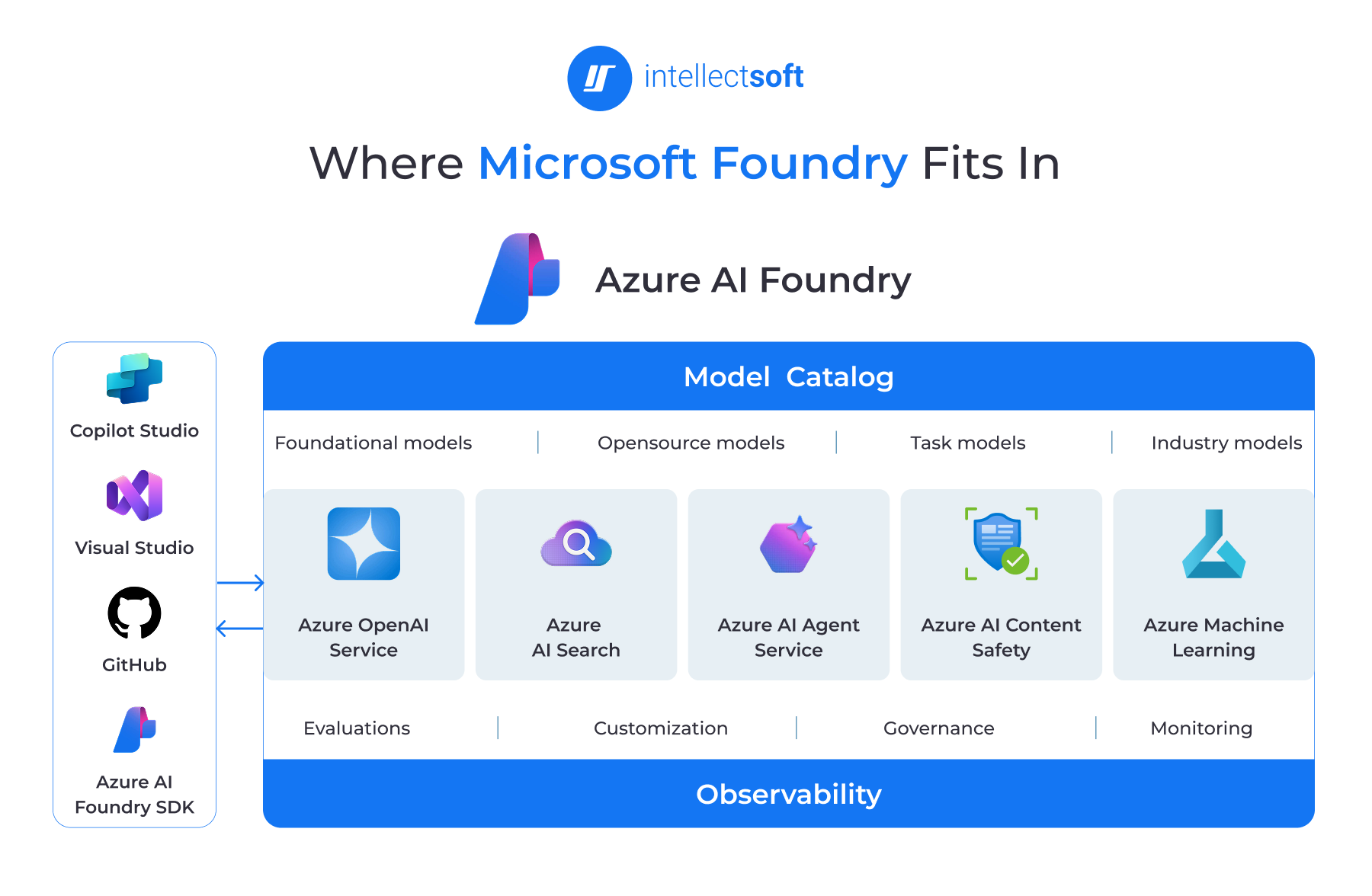
Microsoft Foundry is the platform where you can build, deploy, govern, and scale AI apps and AI agents.
Foundry portal looks like a playground where developers, architects, data engineers, and business teams can work together to create AI solutions.
Inside Foundry, you can:
- Experiment with different AI models
- Build AI agents
- Deploy AI applications
- Configure evaluations
- Monitor performance
- Govern AI solutions throughout their lifecycle
A good analogy is Tony Stark's workshop. That's where he built JARVIS, designed new suits, tested new technologies, and had all the tools he needed in one environment. Microsoft Microsoft agent framework plays a similar role. It's a single workspace where you can build, test, deploy, and manage enterprise AI without switching between tools.
From business problems to AI solutions
AI development starts with a business process, such as customer support, sales, HR, finance, and operations.
In these areas, companies spend much time on repetitive manual work. They search for data and need to jump between systems to complete a simple request. AI agents can fix this.
The next layer is the AI use case. Depending on the business need, this can include:
- AI assistants
- AI agents
- Workflow automation
- Enterprise knowledge search
- AI Copilots for business analytics
- Operational agents
- Document retrieval assistants
- AI plugins for SaaS products
Microsoft Foundry is the platform layer that helps us build these AI solutions and connect a business problem with the right AI implementation.
At the center is Microsoft Foundry. It brings together everything needed to build enterprise AI platform:
- AI agents
- Foundation models
- Tools and integrations
- Evaluation
- Monitoring
- Governance
Foundry sits between business problems and the client's technology stack. It doesn't replace existing systems or require companies to rebuild them. Instead, it extends them by adding an intelligent AI layer on top.
Below Foundry are the client's existing systems – APIs, databases, SharePoint, CRM, ERP, ticketing systems, file storage, and other enterprise apps.
Foundry connects all these systems, so AI agents can find information, complete business tasks, and automate workflows in a secure and governed way.
Microsoft Foundry vs Competitors
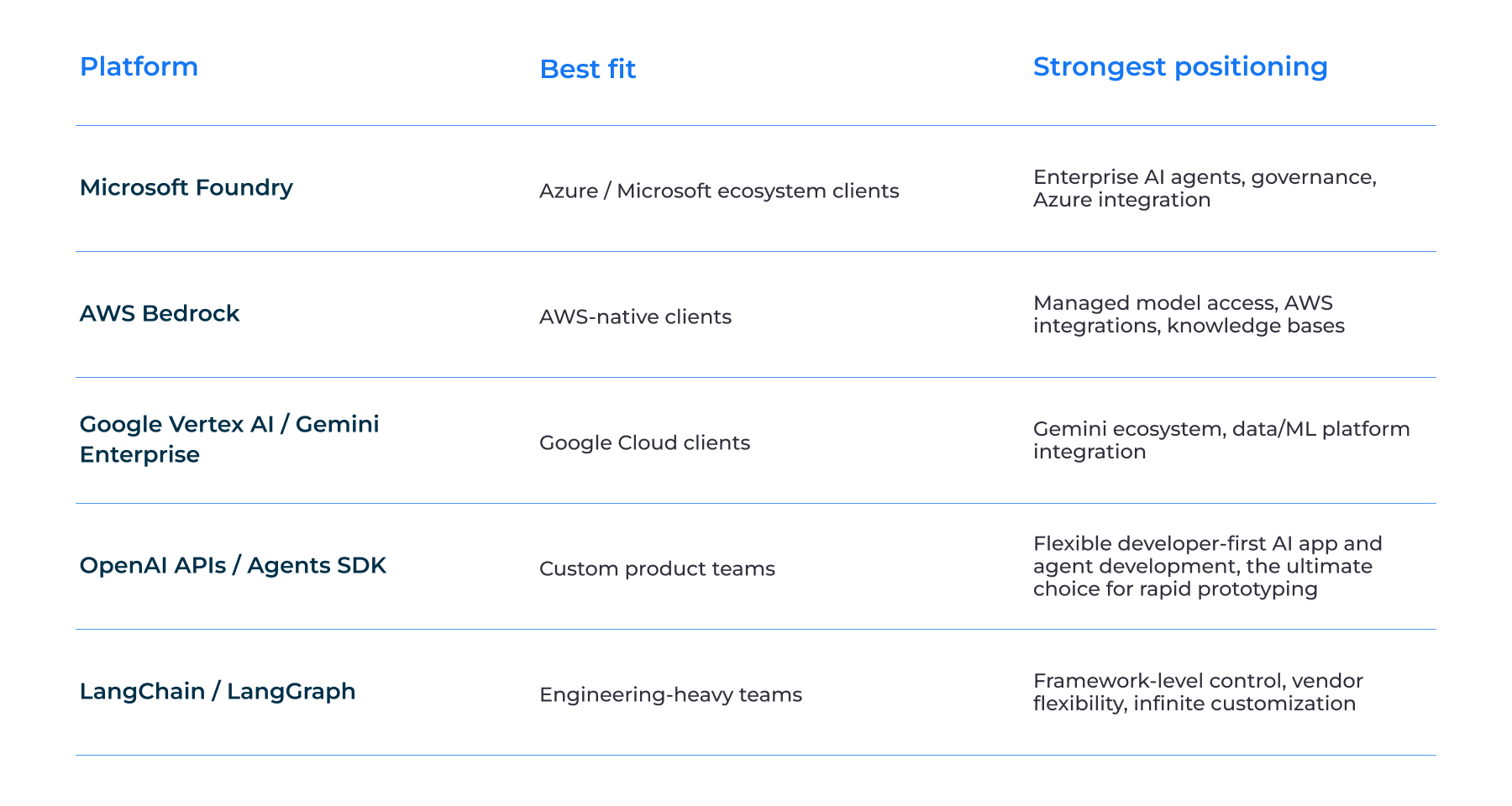
As we mentioned above, Microsoft is not the only player in the market. There are several big vendors that offer their own platforms for building AI agents and assistants.
Microsoft Foundry
As a rule, we opt for Microsoft Foundry when our clients already use Microsoft technologies – Azure, Microsoft 365, Microsoft Entra ID, SharePoint, SQL Server, Microsoft Teams, and Microsoft Dynamics.
Plus, if your infrastructure already runs on Microsoft, it will be easy to integrate it with Foundry. Microsoft has made it as simple as possible for its products to work together, which significantly reduces the effort required to build and deploy enterprise AI solutions.
AWS Bedrock and Google Vertex AI
When we talk about AWS Bedrock and Google Vertex AI, the logic is the same. If a client already uses the AWS or Google ecosystem, it usually makes sense to consider their platforms first. They integrate naturally with the services the company already has, making development and operations much simpler.
OpenAI
When it comes to OpenAI, the story is a bit different. It’s great for swift prototyping. If you need to build something quickly and understand whether AI can solve a particular business problem, OpenAI is often the fastest option but expensive. You can create a prototype in a few days instead of a few weeks.
LangChain and LangGraph
LangChain and LangGraph are also very popular today. We usually recommend them when there is a strong and mature engineering team. They are more complex than managed platforms, but they provide an almost unlimited level of customization if you need custom agents.
As you can see, we can’t name one provider who is the best. Your ecosystem, business needs, budget, timeline, and customization influence your choice.
What Client Problems Can Foundry Solve?
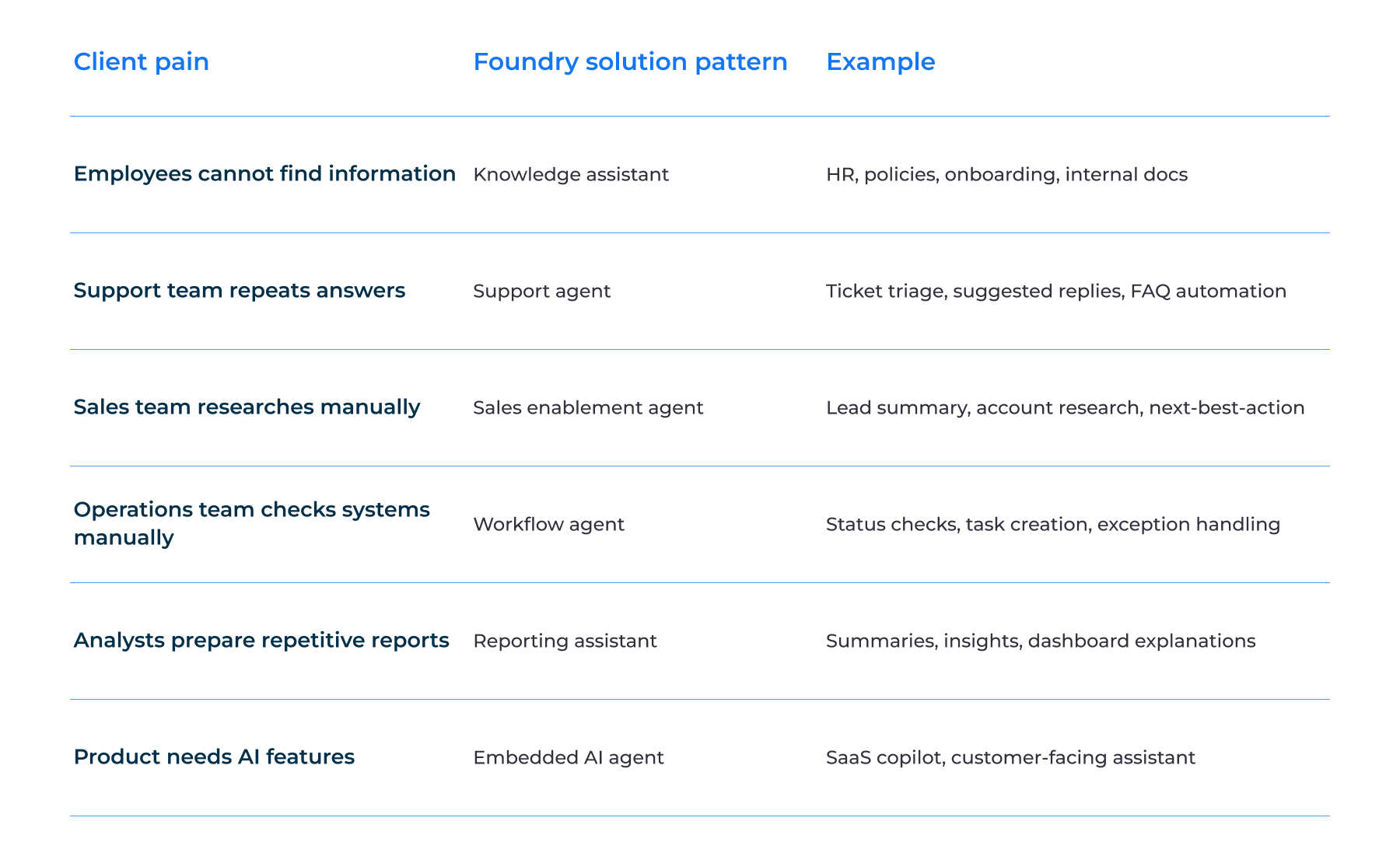
As we already mentioned, Microsoft Foundry works great when a company has repetitive operations – searching, checking, summarizing, copying, validating, or preparing information. These tasks consume a lot of the team's time and don't require strategic actions.
For example, an HR team may reply to questions on policies daily and feel irritated by routine duties. Won't it be a good idea to trust this task to an AI agent? You can train it on your data so that it can respond automatically. Your HR team is pleased and has more time for other tasks. This is especially common for mid-sized and enterprise companies.
Another example is a support team. They often classify tickets, search for information, answer repetitive questions, or respond to internal users. AI assistants can handle these tasks, so your team can focus on more complex customer issues.
The main thing is to start with the business problem, and only after picking the technology.
We don't begin by asking:
"Do you need an AI agent?"
Instead, we ask questions like:
- What business process takes the most time?
- Which tasks are repetitive?
- Where do your employees spend hours searching for information?
- Which processes involve switching between multiple systems?
- What work would you like to automate first?
When we’re aware of business problems and needs, we can decide whether an AI agent is the right solution.
Final Thoughts
Microsoft Foundry is more than another AI platform. It provides everything needed to build, deploy, govern, and scale enterprise AI agents in one environment.
But technology itself is only part of the equation because the main focus is on business processes. An AI agent is the instrument used to boost your productivity and automate repetitive tasks.
No matter what you want to build: an internal HR assistant, customer support agent, or any other solution – Microsoft Foundry offers the engineering platform to turn your idea into a working product.
At Intellectsoft, we start with your business operations to identify gaps that AI agents can address and make you more productive. Contact us if you need consultation on building AI agents with Microsoft Foundry.
FAQ
Can AI agents integrate with existing enterprise systems?
Yes, AI agents built with Microsoft Foundry can connect to enterprise apps, APIs, tools, databases, and Microsoft services. AI agents can securely access your data and use it to perform actions across your workflows.
What types of companies benefit most from Microsoft Foundry agent service?
Both mid-sized companies and enterprises can benefit from Microsoft Foundry, especially if they use Microsoft products. This is a great option for those who want to automate routine business processes with AI.
What repetitive work can Foundry agent service automate?
AI agents built with Microsoft Foundry can automate the following operational tasks:
Document processing
Data entry
Customer support
Invoice handling
Employee onboarding
Report generation
Compliance checks
Knowledge retrieval
How do AI agents built on Microsoft Foundry improve team productivity?
With AI agents, your team gets rid of mundane tasks and can focus on more strategic tasks. This saves time, minimizes manual errors, and speeds up everyday processes – so you get more done.
