Key Takeaways
- Web application architecture sets the ceiling before the first feature ships. Speed, scalability, security, and maintainability are decided here.
- AI changes what each layer does. The presentation layer takes on streaming and adaptive interfaces, the business layer owns model routing and failure handling, and the data layer adds vector storage beside the relational store.
- There is no best architecture, only fit. A monolith is good for MVP or a small team, microservices are great for independent deployments of different teams, serverless is perfect for variable loads, and a PWA is a good choice for content-heavy products with a mobile-first discovery.
- Monoliths are better than their reputation. For a domain still being defined, one codebase removes the network calls, distributed transactions, and service boundaries you would otherwise have to get right before understanding the problem.
- The expensive mistakes are structural. A flawed service boundary is a small correction in month one and a rewrite in month twelve — which is why discovery and architecture design come before implementation.
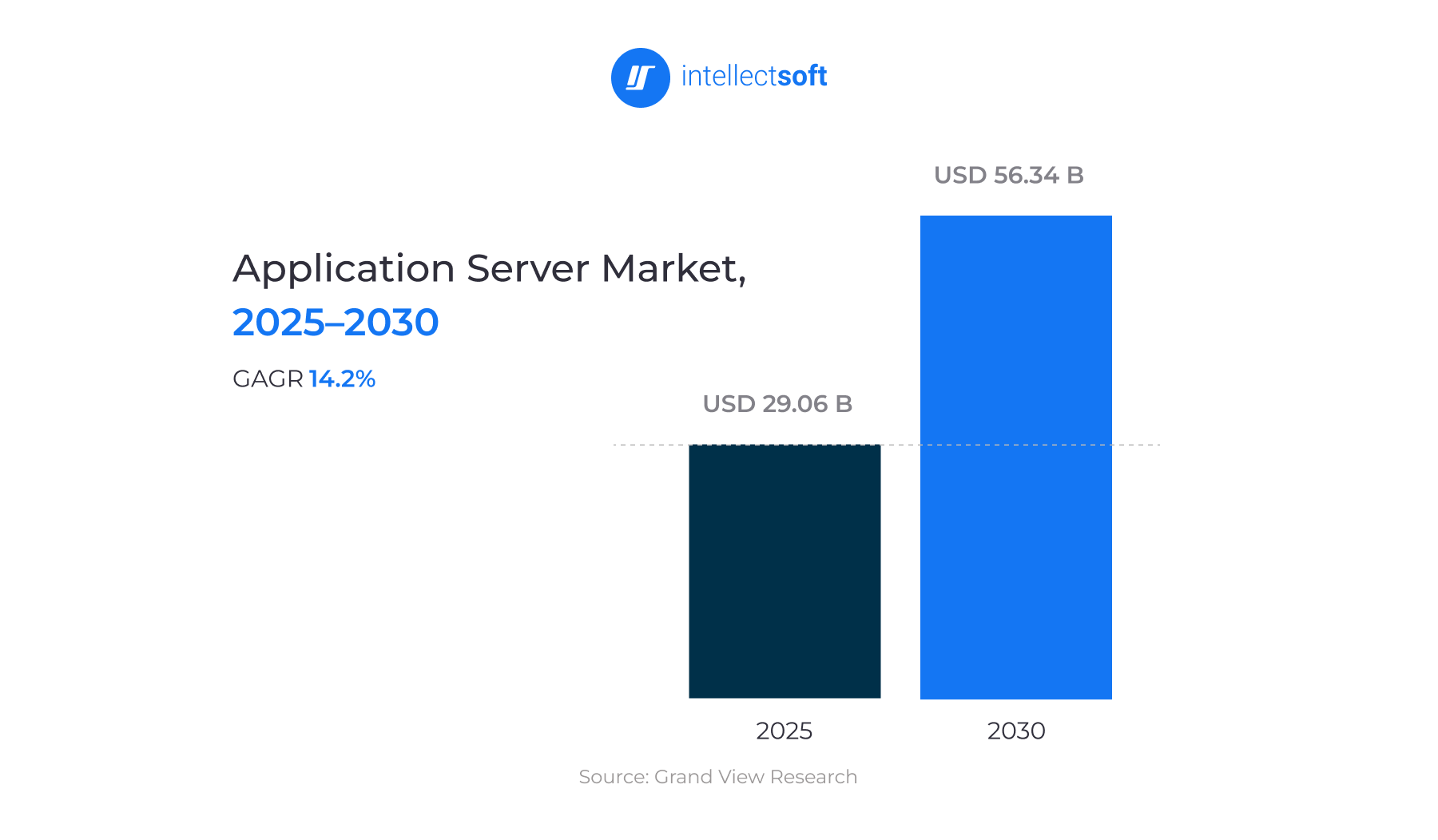
The web application market is really big. And it is going to get even bigger. This industry was worth USD 29.06 billion in 2025, and it will be USD 56.34 billion by 2030. It's all because web application development sits at the center of how most businesses now reach their customers. What that figure does not show is how much of the spending goes into fixing structural decisions made badly at the start.
Web application architecture is where those decisions live. It defines how the client, server, database, and integrations divide the work and communicate — and it sets the ceiling on what the product can do afterward.
The cost of getting it wrong is not abstract. Components that nobody can trace turn every feature into a wider change than it should be. Systems built on a single instance cannot scale horizontally without a rebuild. Access rules bolted on after the structure is fixed leave gaps that regulated products cannot carry. These are properties of the architecture, and fixing them requires architectural changes.
This guide covers the components a web application is built from, the architectural styles and models available, and how to choose between them.
What Is Web Application Architecture?
Web application architecture is the structural framework that defines how an application's components — clients, servers, databases, and middleware — interact to deliver functionality over the web.
Every request follows the same path. The browser sends one; the server receives it, runs the application logic, and then queries the database for any data it needs stored. The database returns a result, the server assembles a response, and the browser renders it. What changes from one application to the next is the split: how much of that logic runs on the client, and how much stays on the server.
The architecture of a web application covers more than code that developers write. Databases, servers, interfaces, integrations, and every exchange between them sit inside it. So do the rules governing those exchanges: which component may request what, in which format, under which permissions.
Web based application architecture decides how a product behaves under real conditions. Speed, scalability, security, maintainability: all of it is set at this level, long before the first feature ships. These are also the hardest decisions to reverse. A framework can be swapped in a quarter, but Service boundaries take years.
Web Application Architecture Diagram Explained
The diagram below represents the flow of one request through all stages of a web application architecture.
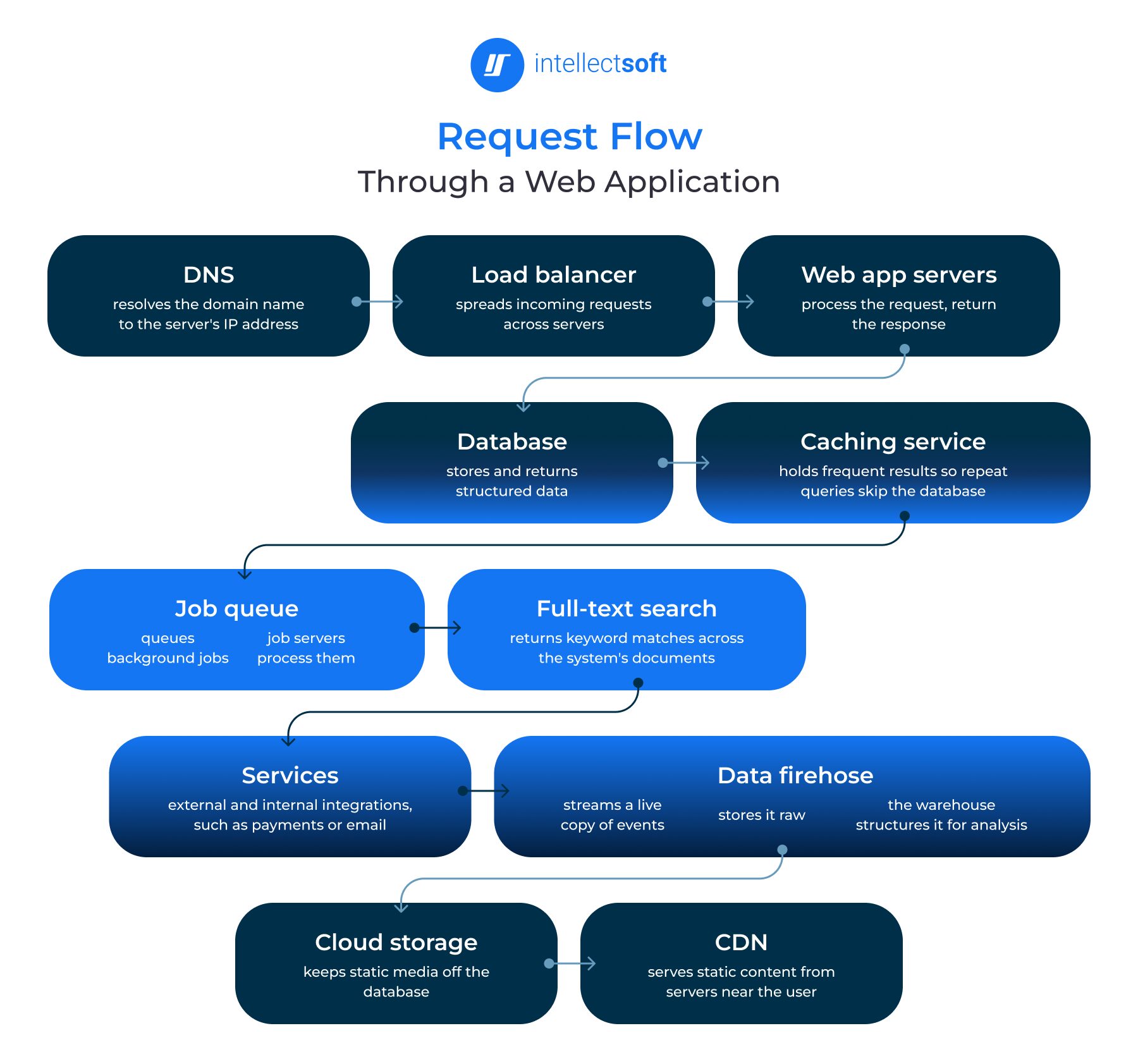
- DNS resolves the domain name to the IP address of the web server,
- A load balancer sends the request to different servers to balance incoming traffic.
- Web app servers process the request and return the response to the user.
- The database stores and returns the structured data the request needs.
- Caching service holds frequently requested results so repeat queries skip the database.
- Job queue (6a) holds background jobs that need to be executed in the system, while job servers (6b) process these jobs.
- Full-text search service returns results matched by keyword across the documents in the system.
- Services are the external and internal integrations the application calls, such as payment providers or email delivery.
- Data firehose (9a) streams a continuous copy of application events, copy of data (9b) stores that stream in raw form, and data warehouse (9c) structures it for analysis and reporting. This branch runs parallel to the request path and never touches the user response.
- Cloud storage is used to store static media on external servers to avoid cluttering the database.
- CDN provides static content from servers close to the user’s location.
The shape of this diagram changes with the pattern. In a three-tier architecture of a web application, elements 3-7 are placed within an application tier while other elements are in the client tier. The two tiers are connected over a network.
In a microservices design, some of the elements denoted above would be split into individual services with their own databases. Some of these elements would also be replaced by an API gateway.
Components of Web Application Architecture
As the applications differ in complexity and functionality, the number of layers and components changes accordingly. In some cases, an app is simple enough to work as a monolith, storing all the web application design architecture in one place.
However, most web apps consist of multiple components, or tiers, that interact with each other. Typically, web application architecture is divided into two major groups: user interface and structural web components. Structural web components, in turn, include both client-side and server-side components.
When numerous components are involved, descriptions alone might not make the entire system clear. This is where a web application architecture diagram comes in handy, offering a visual representation of the components and their interactions. Let's take a closer look at the key components of web application architecture shown in this diagram.
DNS
The abbreviation DNS stands for the domain name system. It's a key element that matches IP addresses to domain names. In this way, a particular server receives a request sent by an end user.
Load Balancer
It directs incoming requests from app users to one of multiple servers, distributing the load more evenly when too many users are active at the same time. Generally, web app services exist as various copies mirroring one another to enable all servers to process requests in the same manner. Also, the load balancer distributes tasks to prevent overload.
Web App Servers
This component is basically an app deployment descriptor. It processes the user's requests and sends responses back to the initial browser. To do this, it refers to the back-end infrastructure, including the database, job queue, cache server, etc.
Database
This component is pretty straightforward. It offers various instruments to perform, delete, organize, and update data entries. Mainly, web app servers interact with the database directly.
Caching Service
This component provides easy, quick data storage and search. When the user receives the info from the server, search results can be cached. As a result, future requests will be returned much faster.
These are the scenarios when caching is efficient:
- Slow or repeated computation
- When a user receives similar results for a specific request
Job Queue (Optional)
This one has two components: a job queue and servers that process those jobs. Many web servers handle a large number of minor jobs. A job that has to be fulfilled goes in the queue and will be processed according to the schedule.
Full-Text Search Service (Optional)
There are plenty of web apps that support search by text feature. After this, an application sends the relevant results to an end user. The whole process is called full-text search, and it can find requested data by keyword among all documents available in a system.
CDN
CDN stands for content delivery network. This system sends static content, including images and other files. Basically, it includes multiple servers that are closer to the geographical locations of end users than an app's database. As a result, CDN delivers content more effectively to users around the globe, drastically reducing load times.
What Is a 3-Tier Architecture?
The majority of web apps are created through the separation of their principal function into layers/tiers. This enables you to quickly and easily replace or upgrade those layers independently. It is called a multi- or a 3-tier architecture.
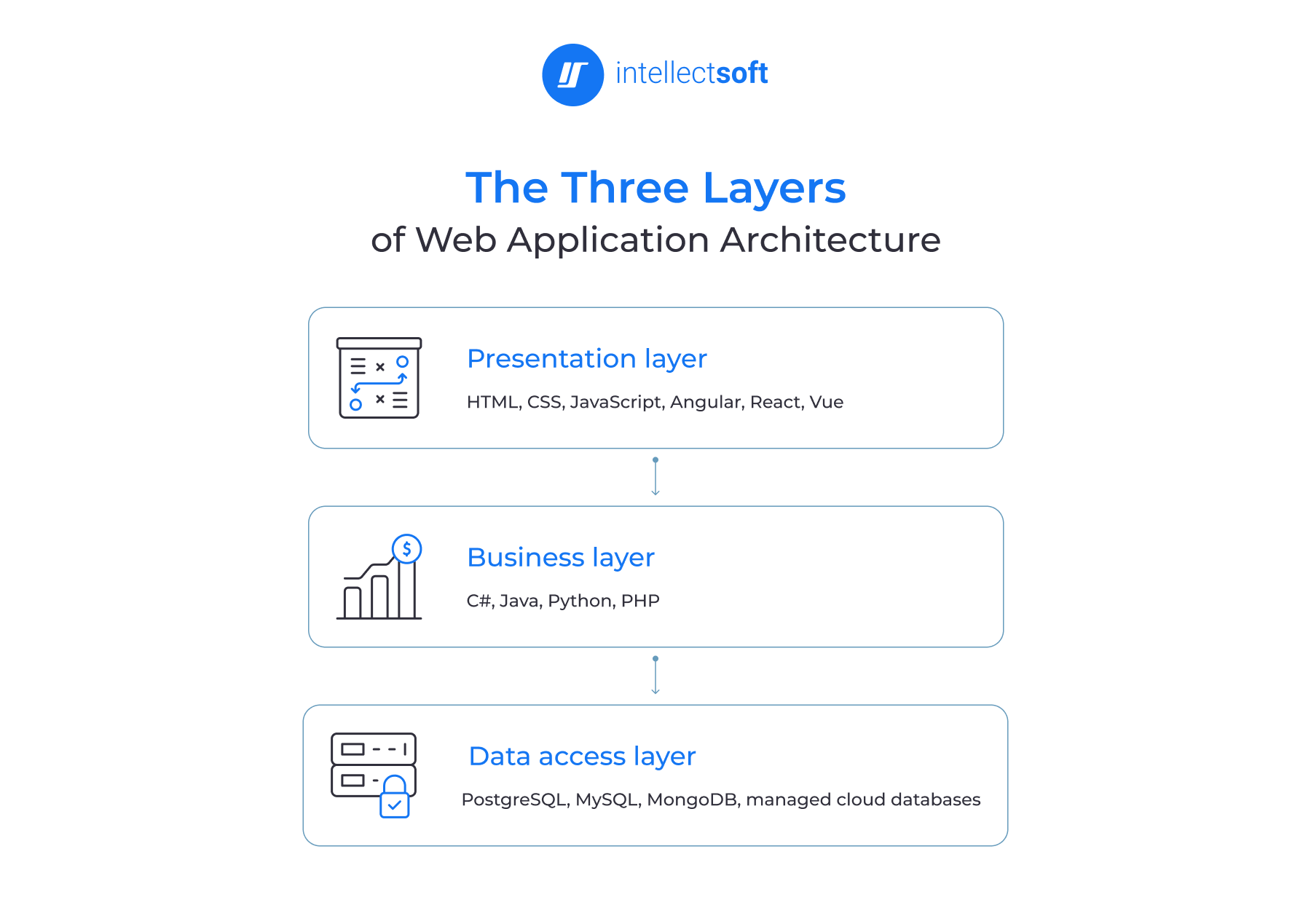
In a 3-tier web architecture, there are three layers/tiers:
- Presentation (client) layer
- Application (business) layer
- Data access layer
It's possible to say that this modern web app architecture is the safest and most secure one. It can be explained by the fact that the client doesn't access the data directly. Application servers can be deployed on multiple machine providers, which enables higher scalability, increased performance, and better efficiency.
Each tier can be scaled independently; therefore, this architecture can be scaled horizontally. In addition, it also significantly improves the overall data integrity, as data will go through the app server, which is the one that decides exactly how and by whom data will be accessed.
Modern Web Application Architecture Layers
Most modern web products use this three-layer approach for their web application architecture — with each having specific roles that don't spill over to the neighboring layers. This way, when you implement each of these layers independently, they can replace/upgrade one while the others stay untouched.
We'll now focus more closely on some core modern web application architecture layers.
Presentation/Client Layer
The presentation layer is the front end. This is the static content and the dynamic interface end users see and act on; its environment is the browser.
HTML, CSS, and JavaScript build the presentation layer. On top of them sit the frameworks developers actually work in — Angular, React, and Vue. The choice of a framework to develop the presentation layer in web app architecture is significant. It can affect the layer’s ability to perform on different devices and the amount of processing that must be performed on the client and server.
Business/Application Layer
The Business Logic Layer (application/middle layer) takes care of processing requests coming from the Presentation Layer. Then it executes all business rules sent by the latter. This layer usually is built using C#, JavaScript, Java, Python or PHP, leveraging frameworks like ASP.NET, Express.js, Nest.js, Spring, Flask, Django and Symfony. So you could host it on servers, on serverless cloud platforms, or even in your PaaS ecosystem.
This layer of web application architecture carries the most weight. The business rules live here, and everything above and below it depends on the contracts it exposes. So, a change to those rules ripples into the interface that calls them and the data model beneath them. That is why edits here are the most expensive to unwind: the cost is not in changing the rule, but in everything wired to it.
Data Access Layer
The data access layer stores and manages the application's data. There are the databases and the database management systems that collect, organize, and retrieve records. As the name implies, the Data Access Layer handles storing/retrieving data. And it sits atop either a relational or a non-relational DB. Your options range from PostgreSQL, Microsoft SQL Server, and MySQL up through MongoDB and finally managed cloud DBMS.
It also acts as a boundary because the client never reaches the data directly. Every request in web app architecture passes through the business layer, which decides how and by whom data is accessed.
The three layers operate independently and exchange data through defined components. In the architecture of modern web applications, that independence is the point. It is what makes a system possible to scale, test, and maintain over years rather than quarters.
How AI Is Changing Modern Web App Architecture
AI solutions are not bolted onto an existing stack. They change what each layer has to do, and the decisions land at the architecture stage.
This is how artificial intelligence expands modern web app architecture:
- Presentation layer. Interfaces that adapt to the user break the assumption that a component renders the same way for everyone. Personalized layouts and conversational interfaces need components with typed, constrained APIs, so generated or reordered elements stay inside brand and layout rules. Streaming output changes state handling too. Tokens come over Server-Sent Events or WebSockets rather than a request/response cycle, leaving the client with an incomplete state compared to any previous pattern had to manage.
- Business layer. AI agents add orchestration work that previously didn’t need to be done. It relates to routing a request to the correct model, using the appropriate tools, running multi-step workflows, and deciding what to do if/when any step fails. AI adds a layer that manages retries, timeouts, and cost controls, and sits in between the user and one or more model providers. It is the teams working on these systems at this layer that are making decisions about integration rather than end features.
- Data layer. Retrieval-augmented generation requires vector databases alongside the relational store, because similarity search is a different access pattern than a structured query. Training and retraining pipelines add a second data path running parallel to the application. Model performance also degrades as data patterns shift, which is why monitoring belongs in the pipeline from the start.
- Edge inference. Latency-sensitive features cannot tolerate a round trip to a central model service. Running smaller models at the edge or in the browser cuts that distance, at the cost of model size and deployment complexity. Where inference runs determines what the feature can be.
Each of these decisions constrains the others. That is why AI development works best when the target architecture is defined before implementation begins, rather than assembled around a model that was chosen first.
Legacy vs Modern Web Application Architecture
Legacy web systems were built for predictable load on hardware the company owned. Modern web application architecture assumes the variable one on infrastructure the company rents. That single difference explains most of what follows.
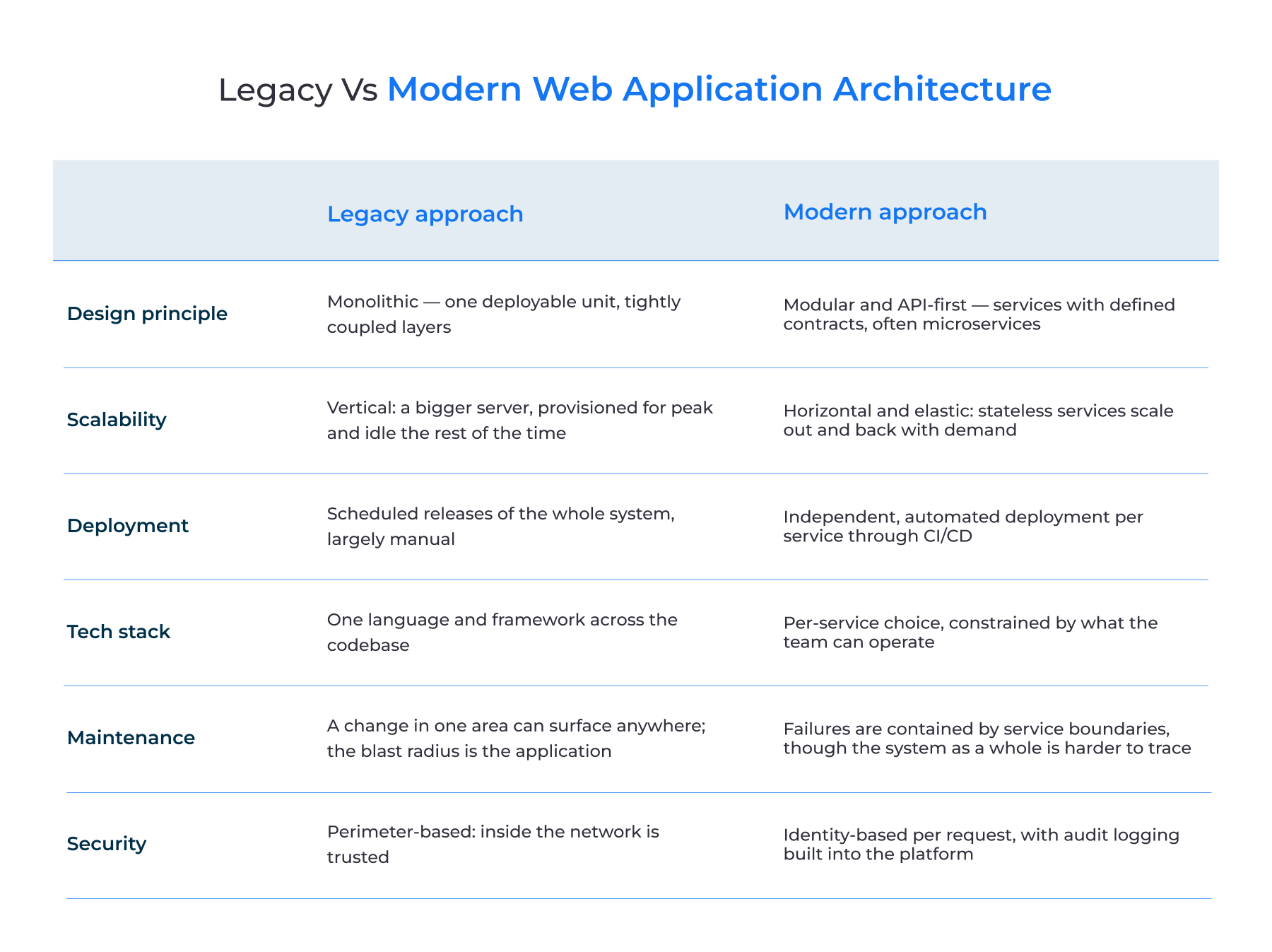
The trade-off is not necessarily one-way. Microservices move complexity elsewhere, primarily into the network, the deployment, and the observability stack. A monolith is better, at least initially, if the domain is not well understood. Also, the monolith has advantages when the team is too small to manage a distributed system, or the load is known, and the amount of traffic is easily handled.
Types of Web Application Architecture
A web application architecture type is a particular pattern under which the components interact with each other. The overarching layers might be divided into client-side architecture, server-side architecture, and a hosting approach.
Client Side
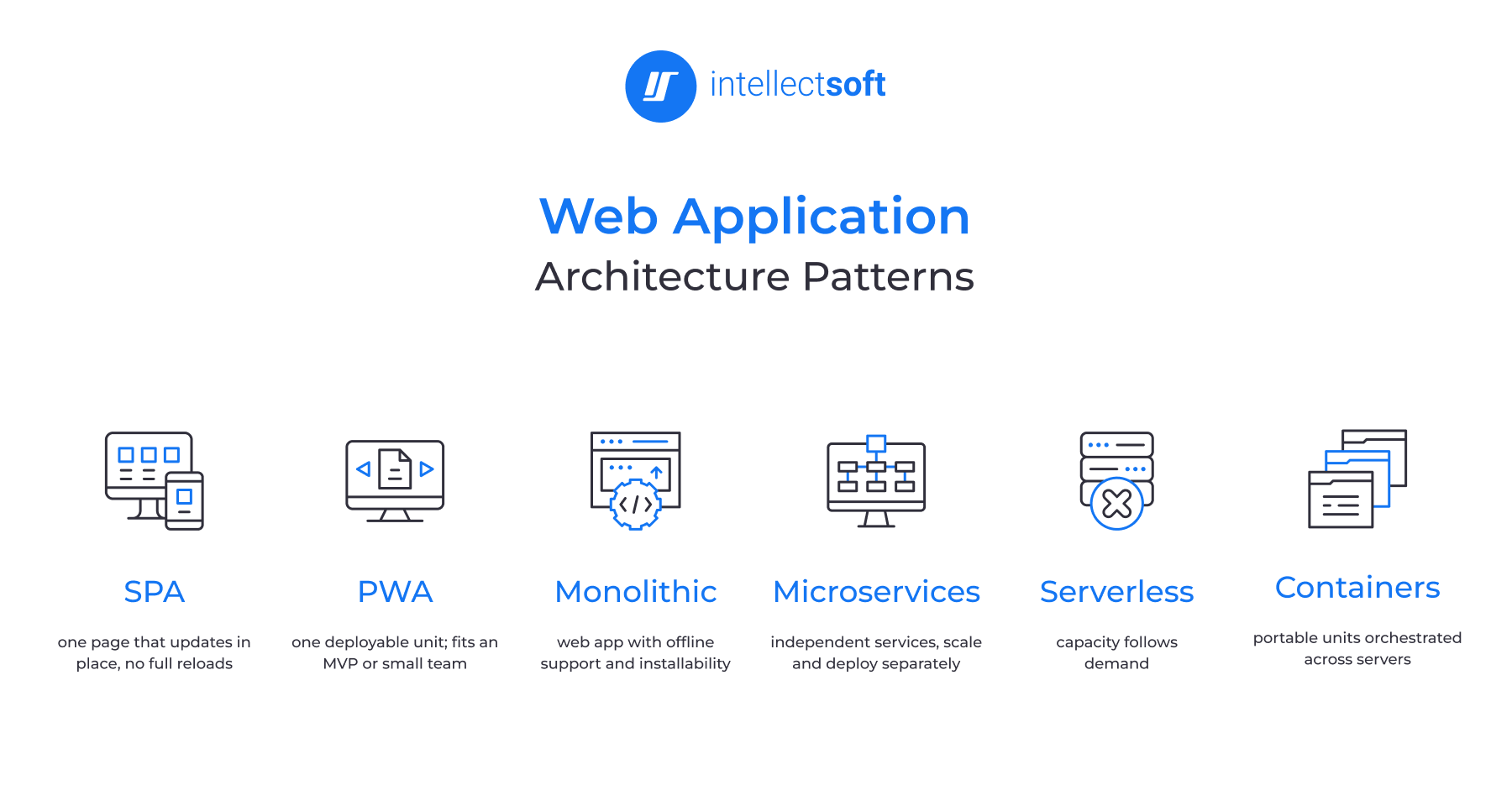
Single-Page Application Architecture
This web application architecture is designed to show relevant content only. To make this happen, it first loads the relevant web page and then dynamically updates the representation of its content with the requested information only.
In other words, it doesn't refer to the server for loading new pages but sends requests for the needed parts of the web page only.
Single-page applications contribute to smoother performance and a more intuitive user experience.
Pros of single-page app architecture:
- Faster performance
- Improved flexibility of UX
Cons of single-page app architecture:
- Increased testing time
- Possible loss of unsaved progress
- Slower first-load speed
Progressive Web Apps
Thanks to their unique format, progressive web apps are still among the most promising web app trends. They offer a convenient and effective user experience that is available from any browser and device through a shared URL.
Progressive web apps are widely used in entertainment, finance, and eCommerce industries. Their key benefits include a lightweight build, cost-effectiveness, cross-device nature, ability to attract web traffic, and a fully functioning app experience.
Pros of progressive web app architecture:
- Browser availability
- Mobile-first approach
- Increased traffic
- Effective offline performance
Cons of progressive web app architecture:
- Restricted browser support
- Narrow use of native APIs
Server Side
Monolithic Architecture
A monolith keeps all the functions in one deployable unit. The user interface, business logic, and data access layers are all written, tested, and deployed as one application. This approach is more often correct than many people believe.
For an MVP, a small team, and a domain that is not clear yet. Having everything in one codebase removes all the unnecessary complexity of web application architecture. There is nothing to deploy, nothing to scale, no network calls between services, no distributed transactions. So, there is nothing to get wrong before anyone understands the domain properly. And that, inevitably, happens later, when the codebase and team grow.
Pros of monolithic application:
- Simpler to develop, deploy, and debug;
- Lower initial cost
- No network latency between components
Cons of monolithic architecture:
- Scaling means reshaping the whole application, including the parts under no load
- One technology stack for the whole codebase
- Onboarding slows as the codebase grows
Microservices Architecture
Unlike the monolithic approach, the microservices architecture style designs an application as a set of small services. These services are linked together but deployed separately. Moreover, each service may be developed and maintained independently using different programming languages.
All these services are connected via API gateways. This gateway is responsible for receiving all requests from clients and then routing them to specific services. In addition, the gateway provides authentication and rate limiting features.
Many companies have implemented the microservices architecture to design their products because it offers more advantages. Such companies include Amazon, eBay, and Netflix.
Pros of microservices architecture:
- Easier scaling up
- Better fault tolerance
- Simple-to-understand code base
- Independent module deployment
Cons of microservices architecture:
- Difficulties with testing and debugging
- Complex deployment
Hosting Approach
Serverless Architecture
In web application development, this type of architecture allows you to outsource both server and infrastructure management to a third-party cloud service provider. This way, a web app's logic execution won't interfere with the infrastructure running.
Choosing a serverless architecture is good for companies that want to delegate server and hardware management to a reliable tech partner and concentrate on front-end development tasks instead.
Also, this web application architecture type allows working on small functions in apps. The service providers that assist in server management include Amazon with AWS Lambda and Microsoft with Azure Functions, among others.
Pros of serverless architecture:
- Absence of server management
- Highly scalable
- Minimized latency
- Speed and flexibility
Cons of serverless architecture:
- Security concerns
- High complexity
Containers
Containers are something in between virtual machines and serverless computing. The former consists of an operating system, while the latter implies the use of the host’s kernel, which makes them light, fast to launch, and cost-effective. In addition, unlike the serverless method, containers in web application architecture give developers control over the execution process and resource management.
Furthermore, the Docker technology allows for the creation of a standard image of the application that will work both on the developer’s computer and in production. This eliminates differences in software versions that occur during the transfer of code from one environment to another.
The only technology that can manage hundreds or even thousands of such instances is Kubernetes, which allows them to be arranged in clusters. In so doing, Kubernetes, in particular, is designed to reschedule, scale, manage, and balance the loads of these applications. Hence, all the aforementioned technologies are needed to build a service that manages the application’s entire life cycle, ensuring its high performance and availability.
The cost is operational. Kubernetes is infrastructure a team has to run, and it requires people who can run it.
Advanced & Scalable Web Application Architecture (Cloud Tools)
Digital technologies constantly evolve, creating new possibilities for web applications. As a result, their architecture also evolves to accommodate new demands and conditions in business. Three of the most demanded characteristics of web applications today are scalability, reliability, and security. Businesses need to be sure that custom software is reliable and won't fail under load or malicious actions. To satisfy these requirements, developers continually enhance software architecture by implementing more advanced technologies and higher standards.
Today, most requirements regarding the scalability and safety of web applications are met with the help of cloud technologies. Web developers extensively use them for two main purposes: advanced storage and delivery of content and smart balancing of traffic load.
Cloud solutions are the most obvious and optimal choice of technologies for the architecture of most business web applications. That's why a lot of web developers effectively use a wide range of cloud services provided by such IT giants as Amazon, Microsoft, and Google. Today, Amazon Web Services, Microsoft Azure, and Google Cloud Platform are essential tools that can be customized for all types of web applications.
Here are a few examples of cloud migration best practices in web app architecture.
Data Storage Tools
- Amazon S3
- Azure Cloud Storage
- Google Cloud Storage
Storing web app information in the cloud instead of an on-premises server makes data more accessible regardless of users' location. Most cloud service providers offer several subscription plans with various volume and traffic load capacities. They make sure information is kept safe and secure, which is an invaluable advantage for businesses.
Cloud storage also allows developers to optimize access time for users in target geographic areas. This way, customers or employees using a web application will experience fewer lags. After a web application is released, developers can add new cloud storage units, remove existing ones, and change the service subscription plan. This significantly improves scalability and optimizes app costs depending on the scale of the business.
Load Balancing Tools
- AWS Elastic Load Balancing
- Azure Load Balancer
- Google Cloud Load Balancing
Load balancers support the smooth operation of a web application even at times of high traffic loads. This type of technology is especially useful for B2C or retail businesses. Usually, such high load periods are predicted and happen on a regular basis, for example, during holiday seasons. However, sometimes, they occur as a result of malicious attacks intended to disrupt the online operations of a particular company. The most common type is a DDoS attack, which can have a devastating impact on any online business. Load balancing technologies help to distribute excess loads across multiple servers using hardware or software components and predefined policies. This is where the scalability of the architecture is tested most directly.
Caching and Content Delivery Tools
- Amazon CloudFront
- Azure CDN
- Google Cloud CDN and Media CDN
- CloudFlare
Software developers may implement a caching system in application architecture to optimize data access and improve app performance. Usually, an app cache contains the most frequently or recently requested information. It delivers data to a user device much faster than requesting the same information from a database on an application server.
Depending on the architecture, a web application may have a global cache, a distributed cache, or an in-memory cache. Another widely used technology to handle caching is a content delivery network (CDN). It allows developers to reduce load on an application server by rerouting queries to a CDN server instead. Together, caching and content delivery form a layer that a scalable web application architecture relies on as traffic grows.
How to Choose the Right Web Application Architecture
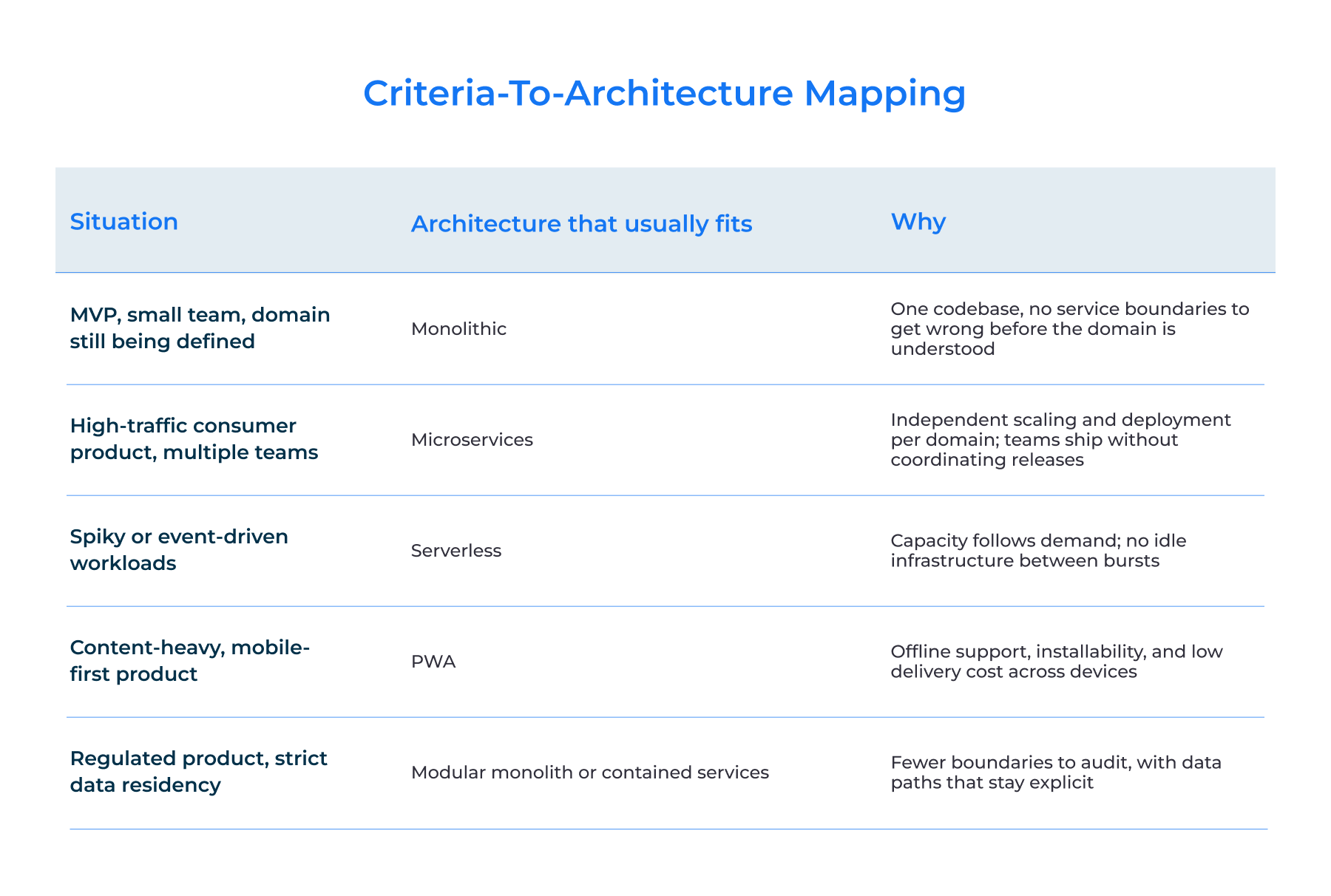
There is no ranking of web application architectures from worst to best. There is only a fit between a set of constraints and a structure that accommodates them. Six criteria carry most of that decision.
Application complexity
A product with two or three domains and a clear scope does not need service boundaries. But the one spanning payments, inventory, logistics, and user management does, because those domains change at different rates and belong to different teams. The question is not how large the application is today, but how many independent areas of change it contains.
Expected traffic and scaling model
Steady, predictable load scales vertically without difficulty. A load that varies by an order of magnitude between minimum and maximum needs infrastructure that can be scaled out, which is stateless services and a database that can be partitioned. It’s worth distinguishing between two questions: how much traffic you have, and how peaked it is.
Security and compliance requirements
Regulated products constrain the architecture before anything else does. HIPAA, PCI DSS, and SOC 2 each dictate where data may live, who reaches it, and what gets logged — and those are structural properties. A product handling payment data or health records has fewer viable architectures for a web application than one that does not, and the shortlist narrows at the design stage, or it gets rebuilt later.
Time-to-market
An architecture for a web application that takes three months to stand up is the wrong structure for a product that needs to be in front of users in six weeks. Distributed systems cost time before they save it. That trade is worth making when the domain is understood and wrong when it is still being discovered.
Budget
Web app development cost appears twice — in the build and in the running. Microservices raise both: more infrastructure, pipeline, and observability, and engineers who can operate all of it. The relevant question is not what the architecture costs to build, but whether the organization can fund its operation for the next three years.
Team expertise
An architecture the team cannot operate is a liability regardless of how well it suits the problem. A team of four without Kubernetes experience will ship faster and more safely on a monolith than on a service mesh. This criterion overrides the others more often than teams expect.
Also, most products do not stay in one row. A monolith with clean internal boundaries can be decomposed when the load and the team justify it. That path is cheaper than starting distributed and consolidating later.
Web Application Architecture Best Practices
Incorrect development decisions can delay project completion by several additional months. So, these web application architecture best practices are relatable during the planning phase since design decisions made at this stage are the cheapest to change.
Plan the System Architecture
The teams that begin coding before designing the system architecture end up with poorly structured components that are hard to debug and update. A systems design sprint at the start costs weeks, and retrofitting a structure onto a running product costs quarters.
Borrowed Architectures Rarely Transfer
A common mistake is to take a successful company's architecture and replicate it. That architecture was shaped by their traffic patterns, their team size, their constraints. A design in web app architecture works when it matches the business it serves, not the business it was borrowed from.
Account for Technical Constraints
The strongest option on paper is not always available. Legacy systems, team skills, and budget all narrow the field. A realistic assessment of quality attributes at the start produces a better result than an ideal design the team cannot deliver.
Structural Problems Compound
They do not resolve themselves. A flawed boundary between two services is a small correction in month one and a rewrite in month twelve. Architectural review belongs in the delivery cycle, not in the post-release backlog.
Build in Security and Compliance From the Start
Security applied after the fact leaves gaps. HTTPS and TLS for data in transit, input validation on every entry point, authentication rules defined at the business layer.
Regulated products carry an additional one. Healthcare products fall under HIPAA, payment handling under PCI DSS, and enterprise buyers increasingly require SOC 2. Each constrains where data lives, who reaches it, and what gets logged. Discovering those constraints after the architecture is set means rebuilding parts of it.
Automate the Delivery Pipeline
Continuous integration and continuous delivery turn releases into a routine event instead of a scheduled risk. The process of automated building, testing, and deploying the code helps identify regression earlier and reduces the time between commit and release. This practice is especially beneficial for large systems; compared to a single monolithic application, a set of separately maintained services requires more operations to deploy.
Treat Infrastructure as Code
Servers, networks, and cloud resources defined in version-controlled configuration files can be reviewed, rolled back, and reproduced. Environments stay consistent, and a staging setup actually matches production. Manual configuration produces environments that drift apart. Those differences surface as failures that appear only in production.
Instrument the System for Monitoring and Logging
Without logs, metrics, and traces, it would be almost impossible to detect issues in a production environment. Tracing is especially important for microservices as it helps determine which service failed and where the problem occurred. In distributed systems, this is not optional. For instance, if a user’s request to the application involved six services, traces will reveal the one that broke the chain.
Define Scaling Policies in Advance
In web app architecture, scalability is set by structure. Stateless services, a caching layer, and a database that can be partitioned all make horizontal scaling possible. Retrofitting these into a system that assumed a single instance is one of the most expensive corrections a team can face.
Agree on the Set of Acceptance Criteria with the Technical Partner
Documenting requirements with the technical partner ensures that everyone shares the same vision, and provides measurable criteria for both sides to evaluate project progress. Worth agreeing on before delivery begins:
- Scalability targets — expected load, and the growth curve the system is built for
- Availability and response-time thresholds
- Security standards the product must meet, and who certifies compliance
- Code quality gates — review process, coverage, static analysis
- Component reuse across modules
- Observability: what is logged, what is traced, who has access
- Deployment automation and rollback procedure
- Defect handling — severity levels and response times
Summing Up
Web application architecture determines what a product can do under load, how safely it handles data, and how much a change costs two years in. It is not a decision to defer to the build phase. And it is not a decision to make without engineers as well, who have shipped comparable systems in your industry.
Intellectsoft has been providing custom software development for Fintech, Healthcare, construction, hospitality, logistics, and eCommerce companies since 2007 — 18+ years of delivery across company sizes. Our web development services cover startups, SMBs, and enterprises worldwide.
A few reasons teams bring us in at the architecture stage:
- Our talent pool spans dozens of tools and technologies across web, mobile, desktop, and cloud builds.
- We have delivered over 600 digital solutions for businesses — the most prominent cases are worth a look.
- Our engineering workforce is distributed across 21 countries.
- Our clients range from early-stage startups to 35 Fortune 1000 companies, among them Audi, Harley Davidson, Universal, Nestle, and Melco.
If you want to see what that architecture would look like for your product, contact us.
FAQ
What web app architecture will fit my needs?
The answer follows from the business goals. These include expected load, data sensitivity, and how quickly the product needs to change after launch. If the choice is still unclear for a specific project, our team will assess it and outline the fitting option along with approximate costs.
What are the reasons to treat a web application system architecture seriously?
Architecture decides how expensive the next two years will be. A sound structure lets new features slot in without touching unrelated components, and it makes scaling a matter of adding capacity rather than rebuilding. It also shortens development time, because engineers are not working around structural obstacles. Security follows the same logic: access rules defined at the architectural level hold, while access rules bolted on afterward leave gaps.
What are the most popular models of web app architecture?
There are three popular models of architecture of web application used in modern web applications.
The “one server, one database” model is rather primitive and does not meet the requirements of modern web software. However, its simplicity allows developers to use it for pre-release testing or for building an MVP. In real-life applications, this model does not ensure the appropriate level of safety and stability because if a server goes down, an app will stop working as well.
The “multiple servers, one database” model is faster and more effective due to its partially distributed nature. The presence of several servers enables the possibility of load balancing, which allows using the full potential of multiple app servers. However, the single database is a potential vulnerability that impacts the safety of a web application.
The “multiple servers, multiple databases” model is the most efficient but also the most expensive in terms of deployment and maintenance. Developers must implement effective means to synchronize information within several databases. Like the previous model, this one may also benefit from load balancing.
What are the business advantages of a well-planned web architecture?
Architecture decides how expensive the next two years will be. A solid structure lets new features slot in without touching unrelated components. Also, it makes scaling a matter of adding capacity rather than rebuilding. It also shortens development time, because engineers are not working around structural obstacles.
For an online retailer, the application is the storefront. It’s where the merchandise is displayed, sold, and shipped. The presentation layer is the interface the customer touches, like browsing products, comparing them, and filling a cart. The business layer holds the logic: it processes what the customer does, applies the rules, and mediates between the interface and the data. The data layer stores the records, such as product descriptions, availability, and pricing. It also keeps the customer's delivery addresses and saved payment options.
The commercial return on getting these layers right shows up in three places. A fast, responsive application can dramatically increase customer satisfaction, which, in turn, drives increased sales. A structurally sound one stays available through traffic peaks instead of failing at the moment demand is highest. And security defined at the architectural level protects both the retailer and its customers.
Monolithic vs microservices: which is better for a web application?
Neither is completely inherently better than the other. It depends on the size of the team, the release schedule, and whether scalability is needed.
If the team working on the product is small, it makes more sense to design it as a single unit because the separation of services would only make the coordination between them more difficult, and there would be little point in it.
On the other hand, if the project requires that different teams release their own services separately, then it makes more sense. The organizational structure of the team should be decided before even considering the technical implementation of the system.
How does AI affect web application architecture?
AI components sit across all three layers in web application architecture. The presentation layer handles streaming and adaptive interfaces, the business layer takes on model routing, tool calls, and failure handling, and the data layer adds vector storage and retraining pipelines alongside the relational store. These are integration decisions, not features added to an existing structure. Edge inference is a further architectural choice — running smaller models in the browser or at the edge removes a round trip that latency-sensitive features cannot afford.
How long does it take to design a web application architecture?
Modern web application architecture takes two to six weeks for discovery and design, depending on complexity. A product with a defined scope and a small number of integrations sits at the lower end. Regulated products, systems with significant legacy dependencies, or programs spanning multiple teams take longer because constraints must be mapped before the structure can be settled. That time is spent once, whereas retrofitting a structure onto a running product costs quarters.
